

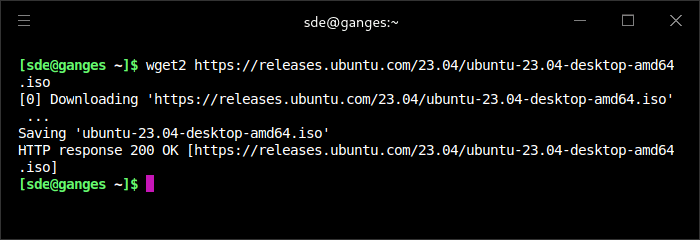
Wget2 is a utility for non-interactive download of files from the Web. It supports HTTP and HTTPS protocols, as well as retrieval through HTTP(S) proxies.
Wget2 is non-interactive, meaning that it can work in the background, while the user is not logged on. This allows you to start a retrieval and disconnect from the system, letting Wget2 finish the work. By contrast, most of the Web browsers require constant user’s presence, which can be a great hindrance when transferring a lot of data.
Wget2 can follow links in HTML, XHTML, CSS, RSS, Atom and sitemap files to create local versions of remote web sites, fully recreating the directory structure of the original site. This is sometimes referred to as recursive downloading. While doing that, Wget2 respects the Robot Exclusion Standard (/robots.txt). Wget2 can be instructed to convert
the links in downloaded files to point at the local files, for offline viewing.
Wget2 has been designed for robustness over slow or unstable network connections; if a download fails due to a network problem, it will keep retrying until the whole file has been retrieved. If the server supports partial downloads, it may continue the download from where it left off.
This is free and open source software.
Key Features
- Support for HTTP/1.1 and HTTP/2.0 protocol
- brotli decompression support.
- zstandard decompression support, RFC8478.
- lzip decompression support.
- HPKP – HTTP Public Key Pinning (RFC7469) with persistent database.
- TCP Fast Open for plain text and for HTTPS.
- TLS Session Resumption including persistent session data cache.
- TLS False Start.
- HTTP2 support via nghttp2 and GnuTLS ALPN including streaming/pipelining.
- OCSP stapling + OCSP server querying as a fallback.
- Use libpsl for cookie domain checking (using Public Suffix List).
- Support link conversion.
- Support for RFC 6266 compliant Content-Disposition.
- RFC 6797 HSTS (HTTP Strict Transport Security).
- Support for bzip2 Content-Encoding / Accept-Encoding compression type.
- Support for XZ Content-Encoding / Accept-Encoding compression type.
- Character encoding of input files may be specified despite from local and remote encoding.
- Support scanning RSS 2.0 feeds from local files.
- Support scanning RSS 2.0 feeds.
- Support scanning Atom 1.0 feeds from local files .
- Support scanning Atom 1.0 feeds.
- Support scanning URLs from local Sitemap XML file.
- Support scanning sitemap files given in robots.txt (Sitemap XML, gzipped Sitemap XML, plain text) including sitemap index files.
- Support arbitrary number of proxies for parallel downloads.
- Multithreaded download of single files.
- Internationalized Domain Names in Applications.
- ICEcast / SHOUTcast support via library.
- Respect /robots.txt “Robot Exclusion Standard”.
- IDN support for international domains.
- autotools support.
- Proxy support.
- Cookies (session/non-session), detection of supercookies via Mozilla Public Suffix List.
- Recursive download of websites with or without spanning hosts.
- Download single web pages / resources.
- zlib/gzip compressed HTTP/HTTPS downloads (gzip, deflate).
- Number of parallel download threads is adjustable.
- Include directive for config files (wildcards allowed).
- Support for keep-alive connections.
- Included CSS, HTML, XML parser needed for recursive downloads.
- gettext support.
- HTTPS via libgnutls (and basic WolfSSL support).
- Support for Metalink RFC 6249 (Metalink/HTTP: Mirrors and Hashes).
- Support for Metalink RFC 5854 (Metalink Download Description Format / .meta4 files).
- Support for Metalink 3.
- Metalink checksumming via libgnutls.
- DNS lookup cache.
- IPv4 and IPv6 support.
- Cross-platform support – runs under Linux, OpenBSD, FreeBSD, Solaris, macOS, and Windows.
Website: gitlab.com/gnuwget/wget2
Support: Documentation
Developer: Tim Rühsen, Darshit Shah, Giuseppe Scrivano, and many contributors
License: GNU General Public License v3.0
Wget2 is written in C. Learn C with our recommended free books and free tutorials.
Related Software
| Alternatives to curl | |
|---|---|
| Wget2 | Successor of Wget |
| Wget | Makes retrieving large files or mirroring entire web or FTP sites easy |
| aria2 | Multi-protocol and multi-source command-line download utility |
| HTTPie | HTTP client with an intuitive user interface |
| curlie | The power of curl, the ease of use of httpie |
| xh | Fast and friendly tool for sending HTTP requests |
| hurl | Run and test HTTP requests with plain text |
| TerminusDM | User-friendly terminal interface for managing your downloads efficiently |
| getparty | HTTP download manager with multi-parts |
| Restish | CLI for interacting with REST-ish HTTP APIs |
| Posting | Terminal-based HTTP client for developing and testing APIs |
| Slumber | Terminal-based HTTP client |
| Alternatives to Wget | |
|---|---|
| Wget2 | Successor of Wget |
| curl | Tool and library for transferring data with URLs |
| aria2 | Multi-protocol and multi-source command-line download utility |
| HTTPie | HTTP client with an intuitive user interface |
| curlie | The power of curl, the ease of use of httpie |
| xh | Fast and friendly tool for sending HTTP requests |
| hurl | Run and test HTTP requests with plain text |
| TerminusDM | User-friendly terminal interface for managing your downloads efficiently |
| getparty | HTTP download manager with multi-parts |
| Surge | Download manager built in Go |
| aria2tui | TUI client for the aria2c download utility |
| gosh-dl-cli | Modern command-line download manager built on top of the gosh-dl engine |
| Axel | Lightweight CLI download accelerator |
| Command line HTTP clients | |
|---|---|
| HTTPie | Command line interface, cURL-like tool for humans |
| aria2 | Multi-protocol and multi-source command-line download utility |
| Wget2 | Successor of Wget |
| Posting | Terminal-based HTTP client for developing and testing APIs |
| hurl | Run and test HTTP requests with plain text |
| curl | Command line tool for transferring data with URL syntax. Transfer library too |
| axel | Command-line download accelerator |
| xh | Fast and friendly tool for sending HTTP requests |
| Wget | Retrieves content from web servers |
| Restish | CLI for interacting with REST-ish HTTP APIs |
| curlie | The power of curl, the ease of use of httpie |
| Slumber | Terminal-based HTTP client |
| TerminusDM | User-friendly terminal interface for managing your downloads efficiently. |
| getparty | HTTP download manager with multi-parts |
Read our verdict in the software roundup.
 Explore our carefully curated directory of recommended free and open source software, covering every major software category. Explore our carefully curated directory of recommended free and open source software, covering every major software category.The directory forms part of our extensive collection of articles for Linux enthusiasts. It includes hundreds of detailed reviews, together with free and open source alternatives to proprietary software from companies such as Google, Microsoft, Apple, Adobe, IBM, Cisco, Oracle, and Autodesk. LinuxLinks also covers interesting projects worth exploring, Linux-compatible hardware, free programming books and tutorials, and much more. Know a useful free and open source Linux application that we haven’t covered? Tell us about it using our submission form. |
Please read our Comment Policy before commenting.