

Linux offers a vast collection of open source small utilities that perform functions ranging from the obvious to the bizarre. It is the quality and selection of these tools that help Linux stand out as a productive environment. A good utility cooperates with other applications, integrating seamlessly.
This article focuses on software tools which let you view 3D models. There’s a wide range of formats available, and most tools don’t support every format.
For 3D printers, the most used file format is STL. An STL file stores information about your 3D model. The format represents the raw surface of a model with small triangles. This file will encode the surface geometry of the object, the concept used at this step is called tessellation. Tesselation is the action of tiling a surface with geometric shapes, and especially triangles
The tools featured here make it very simple to view 3D models. Here’s our verdict captured in a legendary LinuxLinks-style ratings chart. Only free and open source software is eligible for inclusion.
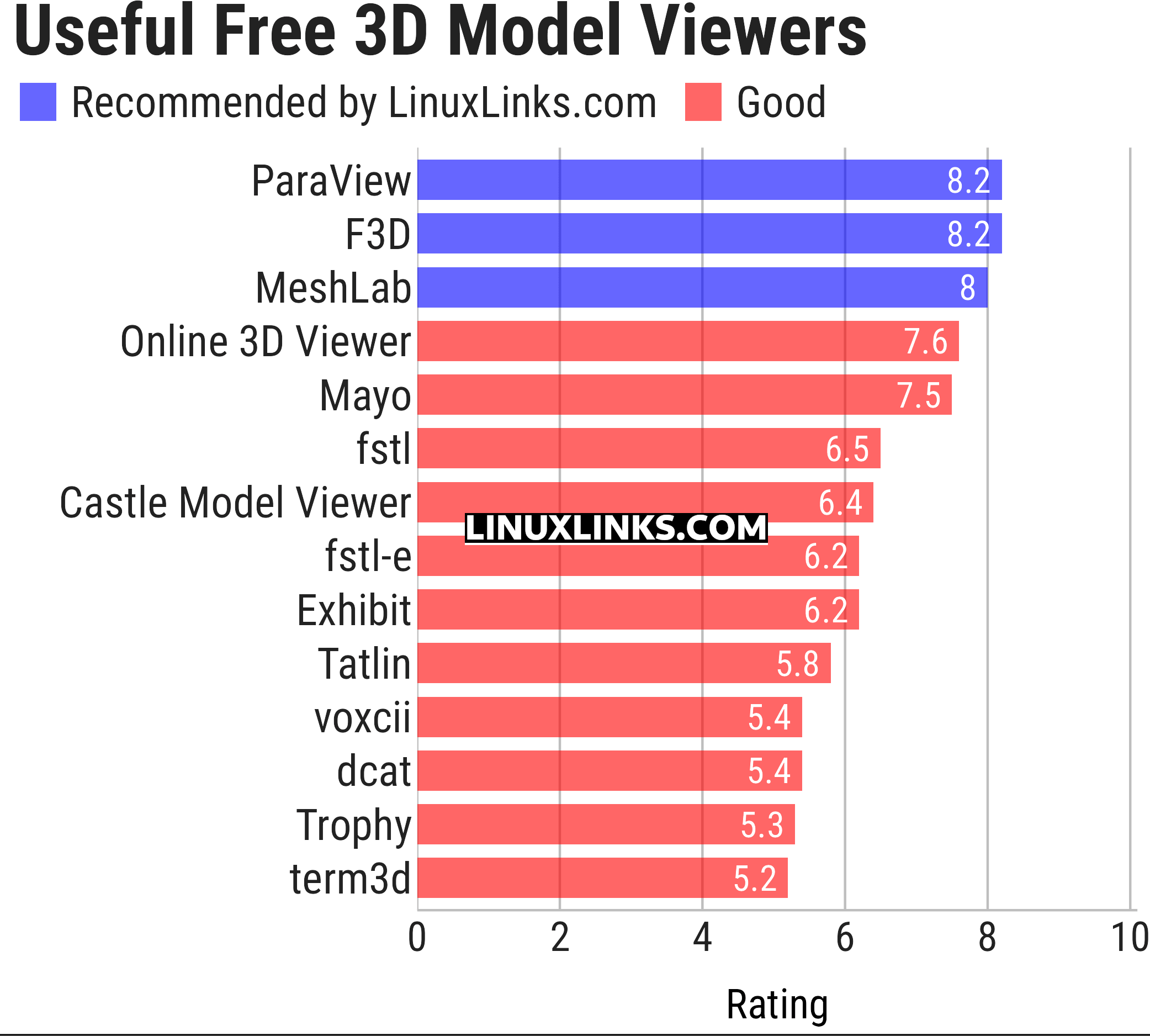
Let’s explore the 3D model viewers at hand. For each title we have compiled its own portal page, a full description with an in-depth analysis of its features, a screenshot, together with links to relevant resources.
| 3D Model Viewers | |
|---|---|
| ParaView | Data analysis and visualization application based on VTK |
| F3D | Fast and minimalist 3D viewer desktop application |
| MeshLab | Processes and edits 3D triangular meshes |
| Online 3D Viewer | Browser-based application for inspecting 3D models |
| Mayo | 3D CAD viewer and converter |
| fstl | Viewer for .stl files. It uses Qt |
| Castle Model Viewer | Supports 3D and 2D model formats |
| fstl-e | Fork of fstl with some fancy enhancements |
| Exhibit | 3D model viewer for the GNOME desktop |
| Tatlin | 3D STL and Gcode viewer |
| voxcii | Terminal-based ASCII 3D model viewer |
| dcat | Terminal-based 3D model viewer |
| Trophy | Terminal 3D model viewer |
| term3d | Terminal-based 3D model viewer |
This article has been updated to reflect the changes outlined in our recent announcement.
 Explore our comprehensive directory of recommended free and open source software. Our carefully curated collection spans every major software category. Explore our comprehensive directory of recommended free and open source software. Our carefully curated collection spans every major software category.This directory is part of our ongoing series of informative articles for Linux enthusiasts. It features hundreds of detailed reviews, along with open source alternatives to proprietary solutions from major corporations such as Google, Microsoft, Apple, Adobe, IBM, Cisco, Oracle, and Autodesk. You’ll also find interesting projects to try, hardware coverage, free programming books and tutorials, and much more. Know a useful open source Linux program that we haven’t covered yet? Let us know by completing this form. |
Please read our Comment Policy before commenting.