

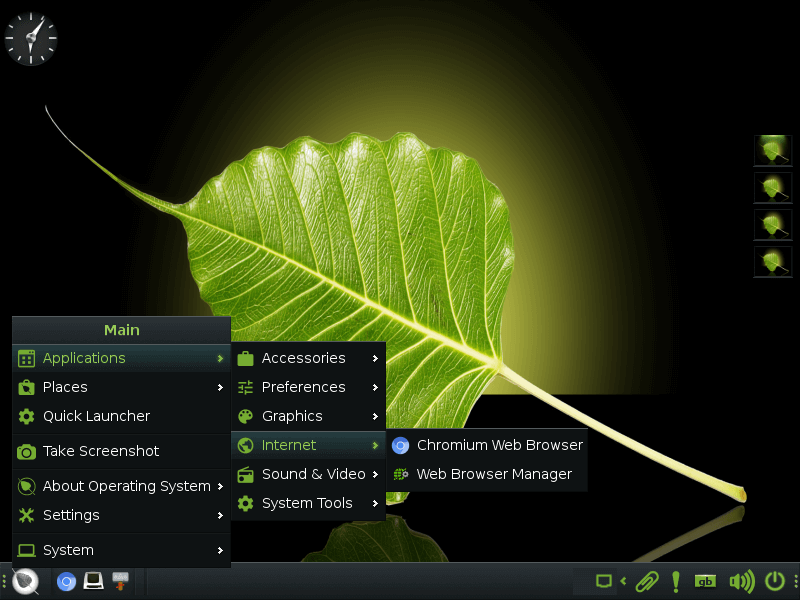
Moksha is an advanced window manager for X11 based on Enlightenment DR17.
Moksha introduces several enhancements, such as many new features and two new modules, the integration of bug fixes and features from upcoming Enlightenment releases, and the elimination of incomplete or malfunctioning elements that were present in E17.
Moksha is currently the default desktop on Bodhi Linux, but it is supported on all Linux-based platforms
This is free and open source software.
Key Features
- Minimalism – A default install of Moksha will run in less than 100 MB of RAM. That is less than most modern Windows Managers, not to mention complete Desktop Environments. But it doesn’t come at the expense of great looks or functionality.
- Highly configurable.
- Organize your tasks with virtual desktops.
- Gadgets – perform a wide variety of functions. Many display system information, such as battery level, time, or CPU frequency. Others allow you to interact with the system in some way, such as adjusting the volume or the screen brightness. Most gadgets allow multiple instances in different locations, for instance on a shelf as well as on the desktop.
- Provides shelves to house your gadgets and launchers – a convenient alternative to having them on the desktop (that is, most gadgets can be added to shelves). Shelves can be located anywhere on a border of your desktop, and you can have more than one shelf on a desktop as well as different shelves on different virtual desktops.
- Shading – an alternative for minimizing a window.
- Desktop icons.
Website: www.bodhilinux.com/moksha-desktop
Support: GitHub Code Repository
Developer: Jeff Hoogland, Robert Wiley, Štefan Uram, Kai Huuhko, Daniel Rammelt, amd the numerous authors of Enlightenment
License: BSD License
Moksha is written in C. Learn C with our recommended free books and free tutorials.
Related Software
| Stacking Window Managers | |
|---|---|
| Openbox | Standards compliant, fast, light-weight, extensible window manager |
| KWin | Window manager for the KDE Plasma Desktop |
| Mutter | Wayland display server and X11 window manager and compositor library |
| FVWM | Powerful ICCCM-compliant multiple virtual desktop window manager |
| berry | Healthy, bite-sized window manager |
| xfwm | Part of the Xfce desktop environment |
| Window Maker | NeXTSTEP-like window manager |
| JWM | Joe’s Window Manager |
| Gala | Designed by elementary for use with Pantheon |
| Fluxbox | Highly configurable and low resource |
| evilwm | Maximises screen real estate and provides good keyboard control |
| Worm | Tiny, dynamic, tag-based window manager |
| Blackbox | Similar to the NeXT interface and Window Maker |
| Enlightenment | Focuses on pushing the limits of existing technologies |
| PekWM | Originally based on the aewm++ window manager |
| Marco | MATE default window manager |
| 2bwm | Offers 2 borders, and written over the XCB library |
| cwm | OpenBSD fork of calmwn, a clean and lightweight window manager |
| IceWM | Win95-OS/2-Motif-like window manager |
| Sawfish | Extensible window manager using an Emacs Lisp-like scripting language |
| Moksha | Modern iteration of the Enlightenment window manager |
| Magpie | X11 window manager and compositor library |
| EMWM | Fork of the Motif Window Manager |
| sowm | Itsy bitsy floating window manager |
| CTWM | X11 window manager derived from twm |
| Compiz | OpenGL window and compositing manager |
Read our verdict in the software roundup.
| Compositing Window Managers | |
|---|---|
| sway | i3-compatible tiling Wayland compositor and a replacement for i3 |
| KWin | Window manager for the KDE Plasma Desktop |
| Mutter | Wayland display server and X11 window manager and compositor library |
| Moksha | Modern iteration of the Enlightenment window manager |
| xfwm | Part of the Xfce desktop environment |
| Compiz | OpenGL window and compositing manager |
| Gala | Designed by elementary for use with Pantheon |
| Enlightenment | Focuses on pushing the limits of existing technologies |
| Magpie | X11 window manager and compositor library |
Read our verdict in the software roundup.
 Explore our comprehensive directory of recommended free and open source software. Our carefully curated collection spans every major software category. Explore our comprehensive directory of recommended free and open source software. Our carefully curated collection spans every major software category.This directory is part of our ongoing series of informative articles for Linux enthusiasts. It features hundreds of detailed reviews, along with open source alternatives to proprietary solutions from major corporations such as Google, Microsoft, Apple, Adobe, IBM, Cisco, Oracle, and Autodesk. You’ll also find interesting projects to try, hardware coverage, free programming books and tutorials, and much more. Discovered a useful open source Linux program that we haven’t covered yet? Let us know by completing this form. |
Please read our Comment Policy before commenting.
A very interesting DE but it takes a while to get the hang of. It looks great without being resource hungry.