

JupyterLab is an extensible open source environment for interactive and reproducible computing, based on the Jupyter Notebook and Architecture.
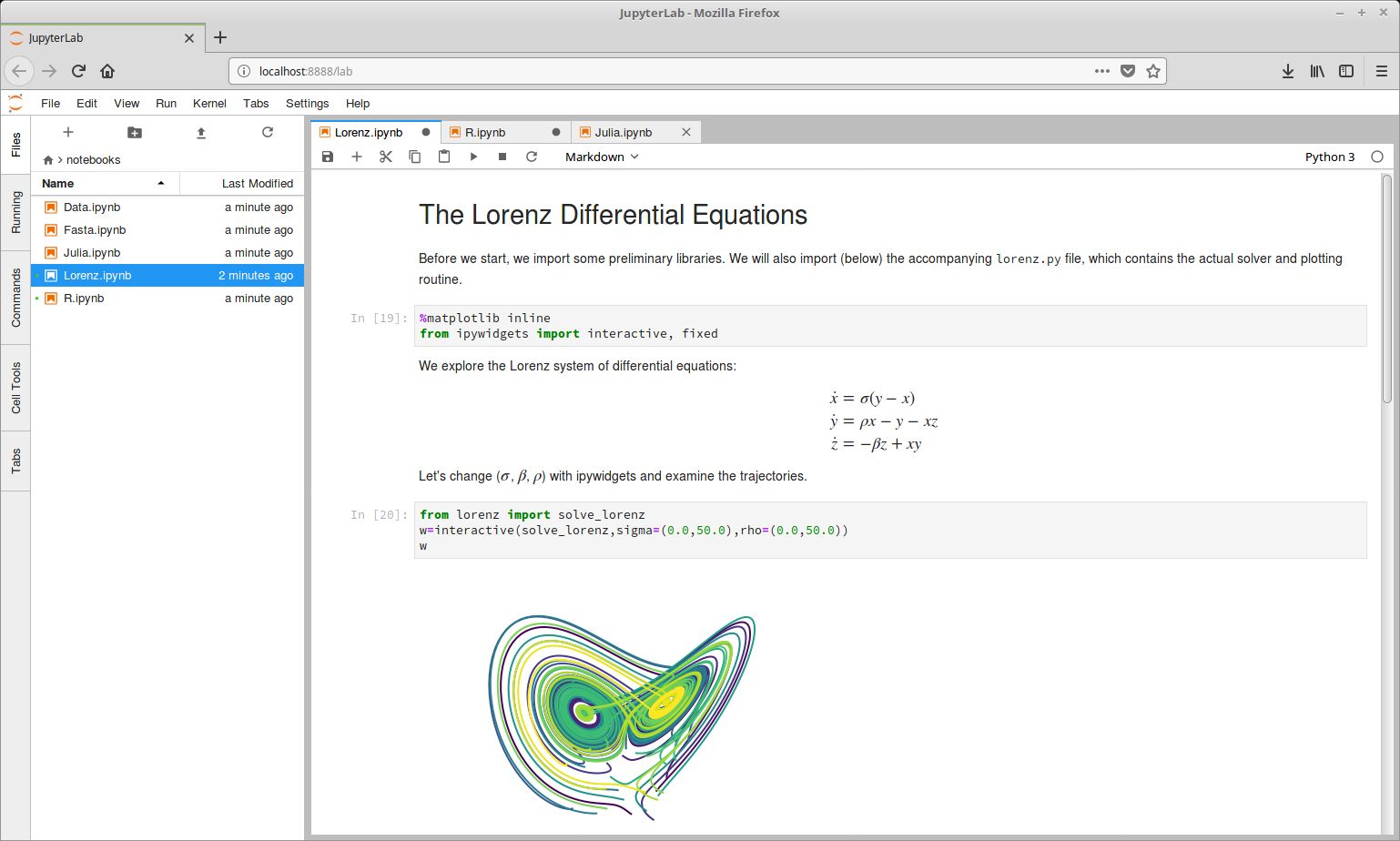
JupyterLab is the next-generation user interface for Project Jupyter. It provides the same building blocks of the classic Jupyter Notebook (notebook, terminal, text editor, file browser, rich outputs, etc.) in a flexible and powerful user interface.
It enables you to work with documents and activities such as Jupyter notebooks, text editors, terminals, and custom components in a flexible, integrated, and extensible manner.
The software is currently in beta state but it’s ready for general usage. JupyterLab 1.0 will eventually replace the classic Jupyter Notebook.
Key Features
- Interface consists of a main work area containing tabs of documents and activities, a collapsible left sidebar, and a menu bar.
- Text editor includes syntax highlighting, configurable indentation (tabs or spaces), key maps and basic theming.
- Jupyter notebooks (.ipynb files) are fully supported. Jupyter notebooks are documents that combine live runnable code with narrative text (Markdown), equations (LaTeX), images, interactive visualizations and other rich output.
- Uses the same notebook document format as the classic Jupyter Notebook.
- Code Consoles provide transient scratchpads for running code interactively, with full support for rich output. A code console can be linked to a notebook kernel as a computation log from the notebook. Code consoles also display rich output, just like notebook cells.
- Kernel-backed documents enable code in any text file (Markdown, Python, R, LaTeX, etc.) to be run interactively in any Jupyter kernel.
- Terminals provide full support for system shells (bash, tsch, etc.) on Mac/Linux and PowerShell on Windows.
- Notebook cell outputs can be mirrored into their own tab, side by side with the notebook, enabling simple dashboards with interactive controls backed by a kernel.
- Multiple views of documents with different editors or viewers enable live editing of documents reflected in other viewers. For example, it is easy to have live preview of Markdown, Delimiter-separated Values, or Vega/Vega-Lite documents.
- Offers a unified model for viewing and handling data formats. JupyterLab understands many file formats (images, CSV, JSON, Markdown, PDF, Vega, Vega-Lite, etc.) and can also display rich kernel output in these formats.
- Customizable keyboard shortcuts and the ability to use key maps from vim, Emacs, and Sublime Text in the text editor.
- Extensions – customize or enhance any part of JupyterLab, including new themes, file editors, and custom components. JupyterLab extensions are npm packages (the standard package format in JavaScript development).
- Connect any open text file to a code console and kernel. This means you can easily run code from the text file in the kernel interactively.
- Unified architecture for viewing and editing data in a wide variety of formats.
Website: jupyter.org
Support: GitHub Code Repository
Developer: Project Jupyter Contributors
License: BSD 3-Clause License
JupyterLab is written in JavaScript and TypeScript. Learn JavaScript with our recommended free books and free tutorials. Learn TypeScript with our recommended free books and free tutorials.
Related Software
| Notebook software | |
|---|---|
| JupyterLab | The next generation user interface for Project Jupyter |
| RStudio | Integrated development environment (IDE) for R |
| Jupyter Notebook | Web-based notebook environment for interactive computing |
| Positron | Next-generation data science IDE |
| marimo | Reactive Python notebook |
| Apache Zeppelin | Multi-purpose notebook |
| IPython | Rich architecture for interactive computing |
| euporie | Terminal interface for Jupyter notebooks and kernels |
| Polynote | Experimental polyglot notebook environment |
| Livebook | Interactive and collaborative code notebooks |
| nteract | Notebooks on your Desktop |
| Pluto | Simple reactive notebooks for Juli |
| Cantor | Frontend for mathematical and scientific software |
| Pretzel | Billed as a modern replacement for Jupyter Notebooks |
| Spark Notebook | Interactive and reactive data science using Scala and Spark |
| BeakerX | Kernels and extensions to the Jupyter interactive computing environment |
Read our verdict in the software roundup.
 Explore our carefully curated directory of recommended free and open source software, covering every major software category. Explore our carefully curated directory of recommended free and open source software, covering every major software category.The directory forms part of our extensive collection of articles for Linux enthusiasts. It includes hundreds of detailed reviews, together with free and open source alternatives to proprietary software from companies such as Google, Microsoft, Apple, Adobe, IBM, Cisco, Oracle, and Autodesk. LinuxLinks also covers interesting projects worth exploring, Linux-compatible hardware, free programming books and tutorials, and much more. Know a useful free and open source Linux application that we haven’t covered? Tell us about it using our submission form. |
Please read our Comment Policy before commenting.