

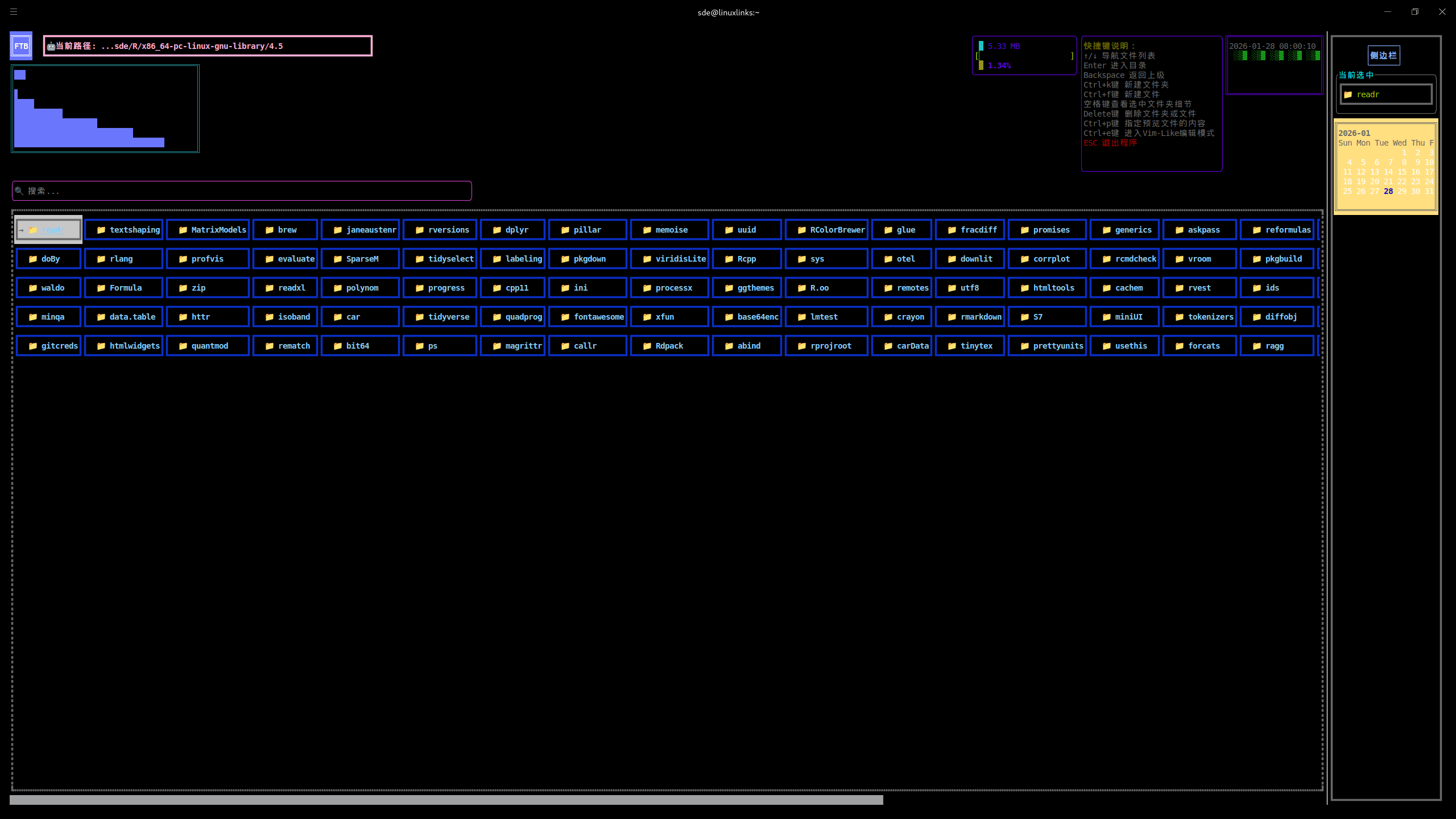
FTB is a powerful terminal-based interactive file browser developed using FTXUI library, providing intuitive directory navigation, file management, SSH remote connection, and MySQL database management capabilities.
Built with high-performance optimizations including smart memory management, asynchronous file operations, and object pooling for smooth user experience.
Some parts of the UI are not translated to English.
This is free and open source software.
Key Features
- File Management:
- Real-time directory content display.
- Color-coded items (blue for directories/red for files).
- Top status bar with current time.
- Path history stack (support backward navigation).
- Keyboard navigation (↑↓ keys for selection, Enter to enter directories).
- Auto-refresh (100ms UI update interval).
- Directory search functionality.
- Memory usage calculation for selected items.
- File Operations:
- File/folder creation and deletion.
- Copy, cut, and paste operations.
- File/folder renaming.
- Clipboard management.
- Attribute preview and file content inspection.
- Advanced Features:
- Vim-Like editing mode – Built-in text editor.
- Image preview – Support for JPG, PNG, BMP, GIF.
- Video playback – MP4, AVI, MKV, MOV, FLV, WMV support.
- Binary file handling – Smart detection and protection.
- SSH Remote Connection:
- Secure SSH connections to remote servers.
- Password and key-based authentication.
- Remote directory browsing.
- Command execution on remote hosts.
- Connection status monitoring.
- Easy-to-use connection dialog.
- MySQL Database Management:
- Local and remote MySQL connections with easy configuration.
- Graphical CRUD operations through intuitive button interface.
- Database management – create, delete, and select databases.
- Table operations – create, delete, and view table structures.
- Data manipulation – insert, update, delete, and query data.
- SQL query executor – direct SQL execution with result display.
- Connection status monitoring and error handling.
- Tabbed interface for organized database management.
- Network Service Management:
- Network connection monitoring with real-time status updates.
- Connection information display – IP addresses, MAC addresses, signal strength.
- Network statistics tracking – data transfer, packet counts, speed monitoring.
- Network speed testing with multiple test hosts and latency measurement.
- WiFi network scanning and connection management.
- Network diagnostics with comprehensive connection testing.
- Tabbed interface for organized network management.
- Keyboard navigation with full keyboard support.
- Customizable Theme System:
- Multiple built-in themes: default, dark, light, colorful, minimal.
- Customizable colors for all interface elements.
- Real-time theme switching with hotkeys.
- Configuration file support (.ftb) for persistent customization.
- Color schemes for files, directories, status bars, and dialogs.
- Layout customization including panel ratios and item counts.
- Style options for icons, animations, and mouse support.
- Performance Optimizations:
- Smart Memory Management: Intelligent pointer usage and container pre-allocation.
- Asynchronous File Operations: Non-blocking file I/O for smooth UI experience.
- Object Pooling: Efficient resource reuse for frequently created objects.
- LRU Caching: Multi-level caching system for directory contents and file metadata.
- Memory Pool: Reduced memory fragmentation and allocation overhead.
- Background Processing: File operations run in separate threads.
- User Experience:
- Modern terminal UI with FTXUI.
- Responsive design and smooth animations.
- Intuitive keyboard shortcuts.
- Error handling and user feedback.
Website: github.com/Cyxuan0311/ftb
Support:
Developer: oldjun
License: MIT License
FTB is written in C++. Learn C++ with our recommended free books and free tutorials.
Related Software
| TUI File Explorers | Language | License |
|---|---|---|
| NERDTree | VimL | WTFPL License |
| xplr | Rust | MIT License |
| nvim-tree | Lua | GNU General Public License v3.0 |
| Treemacs | Emacs Lisp | GNU General Public License v3.0 |
| browsr | Python | MIT License |
| termscp | Rust | MIT License |
| vim-fern | VimL | MIT License |
| tere | Rust | European Union Public License 1.2 |
| CHADTree | Python | GNU General Public License v3.0 |
| FileSSH | Rust | MIT License |
| Rust-Traverse | Rust | MIT License |
| fex | Zig | GNU General Public License v3.0 |
| transgender | Rust | BSD 2-Clause “Simplified” License |
| rovr | Python | MIT License |
| StygianSift | Rust | GNU Affero General Public License v3.0 |
| Fortress | Fortran | MIT License |
| runa | Rust | MIT License |
| sdn | C++ | 0BSD License |
| twf | Go | Developer did not reply to license info request |
| kupo | Python | Developer did not reply to license info request |
| Hop | Python | MIT License |
| FTB | C++ | MIT License |
| faint | Shell | GNU General Public License v2.0 |
Read our verdict in the software roundup.
 Explore our comprehensive directory of recommended free and open source software. Our carefully curated collection spans every major software category. Explore our comprehensive directory of recommended free and open source software. Our carefully curated collection spans every major software category.This directory is part of our ongoing series of informative articles for Linux enthusiasts. It features hundreds of detailed reviews, along with open source alternatives to proprietary solutions from major corporations such as Google, Microsoft, Apple, Adobe, IBM, Cisco, Oracle, and Autodesk. You’ll also find interesting projects to try, hardware coverage, free programming books and tutorials, and much more. Discovered a useful open source Linux program that we haven’t covered yet? Let us know by completing this form. |