

A console application is computer software which can be used with a text-only computer interface, the command line interface, or a text-based interface included within a graphical user interface operating system, such as a terminal emulator (such as GNOME Terminal or the aforementioned Terminator). Whereas a graphical user interface application generally involves using the mouse and keyboard (or touch control), with a console application the primary (and often only) input method is the keyboard. Many console applications are command line tools, but there is a wealth of software that has a text-based user interface making use of ncurses, a library which allow programmers to write text-based user interfaces.
 Console based applications are light on system resources (very useful on low specified machines), can be faster and more efficient than their graphical counterparts, they do not stop working when X is restarted, and are perfect for scripting purposes. When designed well, console applications offer a surprisingly improvement in productivity. The applications are leaner, faster, easier to maintain, and remove the need to have installed a whole raft of libraries.
The whole is greater than the sum of its parts is a very famous quote from Aristotle, a Greek philosopher and scientist. This quote is particularly pertinent to Linux. In my view, one of Linux’s biggest strengths is its synergy. The usefulness of Linux doesn’t derive only from the huge raft of open source (command line) utilities. Instead, it’s the synergy generated by using them together, sometimes in conjunction with larger applications.
So what does the command-line offer users. There are a wide range of console based software which provide the same or similar functionality to their graphical equivalents. In the field of system administration, Linux is blessed with a good range of graphical file managers. However, some users are in their comfort zone managing files from the shell, finding it the fastest way to navigate the file system and perform file operations. This is, in part, because console based file managers are more keyboard friendly, enabling users to perform file operations without using a mouse, and make it quicker to navigate the filesystem and issue commands in the console at the same time.
This article showcases terminal-based batch renamers. We only feature free and open source software. Here’s our verdict captured in a legendary LinuxLinks-style ratings chart.
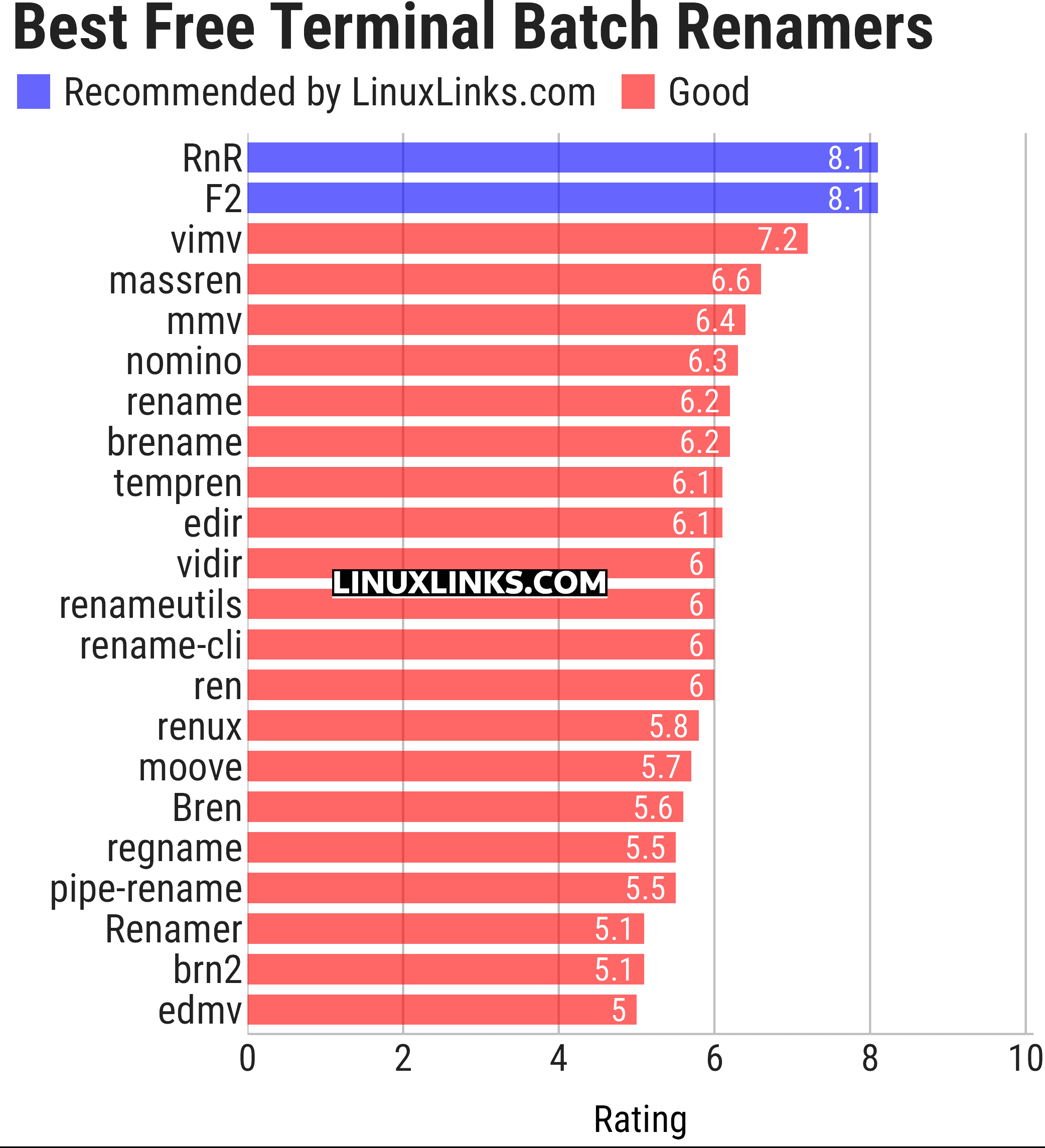
Let’s explore the 22 tools at hand. For each title we have compiled its own portal page, a full description with an in-depth analysis of its features, together with links to relevant resources.
| Console Batch Renamers | |
|---|---|
| RnR | Securely rename multiple files and directories |
| F2 | Command-line batch renaming tool. Fast and safe to use. It's written in Go |
| vimv | Mass rename files using Vim |
| massren | Rename multiple files using a text editor |
| mmv | Rename multiple files with editor |
| nomino | Batch rename utility for developers |
| rename | Rename multiple files using Perl expressions |
| brename | Batch renaming safely |
| tempren | Template-based file renaming utility |
| edir | Utility to rename, remove, and copy filenames and directories |
| vidir | Edit of the contents of a directory in a text editor |
| renameutils | Five programs – qmv, qcp, imv, icp and deurlname |
| rename-cli | Rename files quickly |
| ren | Takes find-formatted lines via standard input, and batch renames them |
| renux | Regex, placeholders, and text transformations |
| moove | Manipulate file names and locations |
| Bren | Bulk file renaming software |
| regname | Mass renamer utility with a text user-interface |
| pipe-rename | Edit filenames using your preferred text editor |
| Renamer | Flexible and extensible through plugins |
| brn2 | Fork of brn |
| edmv | Bulk rename files using your preferred text editor |
This article has been updated to reflect the changes outlined in our recent announcement.
 Explore our comprehensive directory of recommended free and open source software. Our carefully curated collection spans every major software category. Explore our comprehensive directory of recommended free and open source software. Our carefully curated collection spans every major software category.This directory is part of our ongoing series of informative articles for Linux enthusiasts. It features hundreds of detailed reviews, along with open source alternatives to proprietary solutions from major corporations such as Google, Microsoft, Apple, Adobe, IBM, Cisco, Oracle, and Autodesk. You’ll also find interesting projects to try, hardware coverage, free programming books and tutorials, and much more. Know a useful open source Linux program that we haven’t covered yet? Let us know by completing this form. |
Please read our Comment Policy before commenting.