

It has often been said that information confers power, and that the most important currency in our culture today is information. Keeping track of bits and pieces of information is a minefield.
In part, this is because of passable short term memory, coupled with what can only be described as ‘brain fog’. To combat this, we arm myself with open source software that helps us efficiently capture a lot of information. We generally prefer to keep our information local and cloud-free, primarily for security reasons. And we primarily advance software which doesn’t tie itself to any specific company or service, whether it’s Evernote, Google, or Microsoft.
Note-taking apps are the online equivalent of notebooks, and because they’re digital, they can do more for you than paper can. Note-taking apps also include text search, so in a matter of seconds, you can find whatever notes you need.
There is a wide range of competent note taking software for Linux. This article focuses on apps that have a Text User Interface (TUI). A TUI program is a terminal-based application that provides an interactive, menu-driven interface using text and keyboard navigation rather than a graphical interface (GUI).
Here’s our verdict captured in a legendary LinuxLinks-style ratings chart. Only free and open source software is eligible for inclusion.
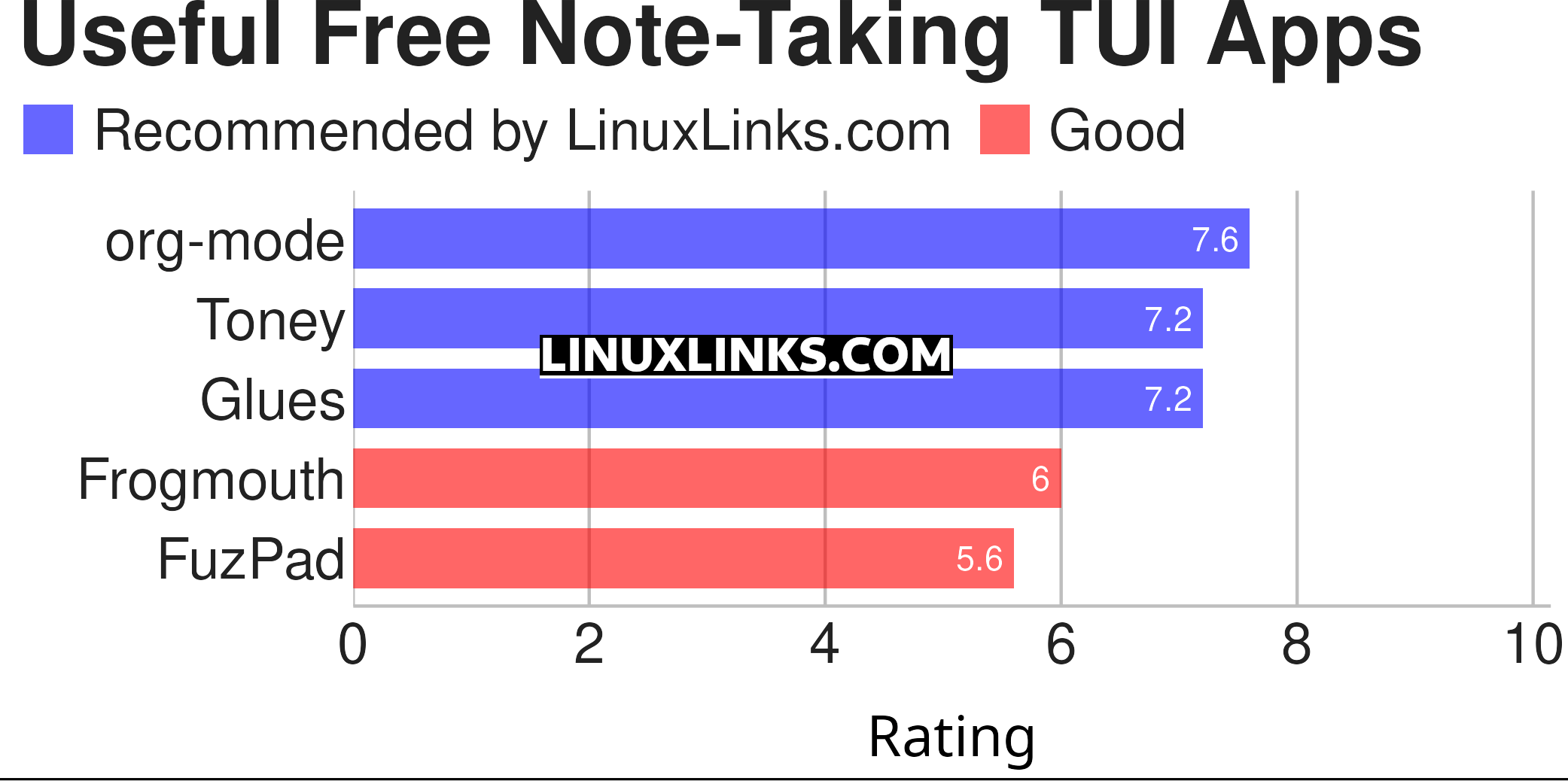
Click the links below to learn more about each application.
| TUI Note Taking Apps | |
|---|---|
| org-mode | Emacs major mode for keeping notes, authoring documents, and more |
| Toney | Fast, lightweight, terminal-based note-taking app for the modern developer |
| Glues | Vim-inspired TUI note-taking app |
| Frogmouth | Markdown browser for the terminal |
| FuzPad | Minimalistic note management solution |
 Explore our comprehensive directory of recommended free and open source software. Our carefully curated collection spans every major software category. Explore our comprehensive directory of recommended free and open source software. Our carefully curated collection spans every major software category.This directory is part of our ongoing series of informative articles for Linux enthusiasts. It features hundreds of detailed reviews, along with open source alternatives to proprietary solutions from major corporations such as Google, Microsoft, Apple, Adobe, IBM, Cisco, Oracle, and Autodesk. You’ll also find interesting projects to try, hardware coverage, free programming books and tutorials, and much more. Know a useful open source Linux program that we haven’t covered yet? Let us know by completing this form. |