
A code formatter is an automated tool designed to adjust source code according to a predetermined set of formatting guidelines, like how indentation and spacing should look and where line breaks should go. By doing this, it enhances the code’s readability and maintains consistency, all while ensuring that the code’s functionality remains unchanged. This not only saves developers valuable time but also helps minimize disagreements over style preferences.
This type of software means coders cede control over minutiae of hand-formatting. In return, the software offers speed, determinism, and freedom from pycodestyle nagging about formatting. Save time and mental energy for more important matters.
This roundup selects some useful code formatters for Kotlin developers.
Here’s our verdict captured in a legendary LinuxLinks-style ratings chart. Only free and open source software is eligible for inclusion.
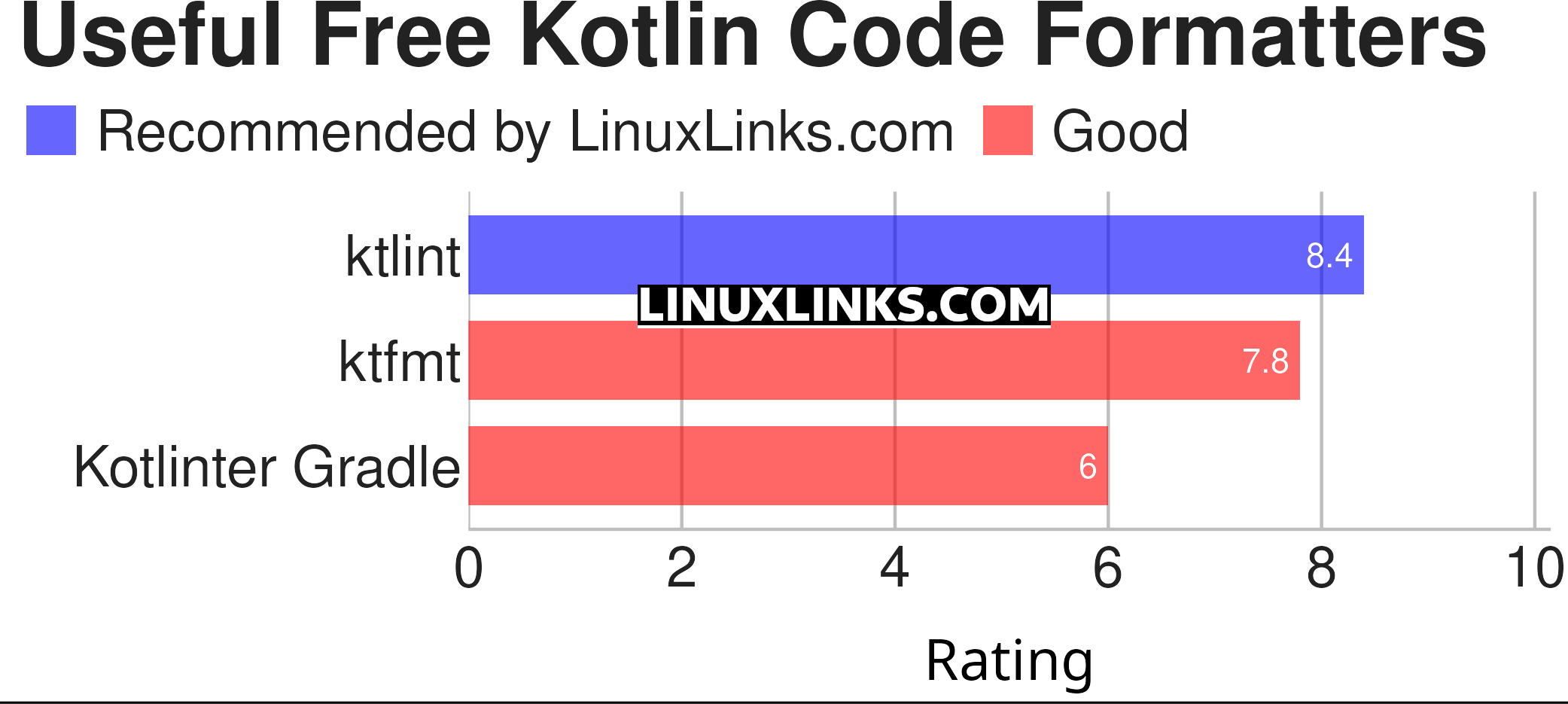
Click the links in the table below to learn more about each tool.
| Kotlin Code Formatters | |
|---|---|
| ktlint | Kotlin linter with built-in formatter |
| ktfmt | Pretty-prints (formats) Kotlin code |
| Kotlinter Gradle | Plugin for linting and formatting |
 Explore our comprehensive directory of recommended free and open source software. Our carefully curated collection spans every major software category. Explore our comprehensive directory of recommended free and open source software. Our carefully curated collection spans every major software category.This directory is part of our ongoing series of informative articles for Linux enthusiasts. It features hundreds of detailed reviews, along with open source alternatives to proprietary solutions from major corporations such as Google, Microsoft, Apple, Adobe, IBM, Cisco, Oracle, and Autodesk. You’ll also find interesting projects to try, hardware coverage, free programming books and tutorials, and much more. Know a useful open source Linux program that we haven’t covered yet? Let us know by completing this form. |