

PipeWire Soundpad (PWSP) is a simple yet powerful soundboard application written in Rust.
It provides a user-friendly graphical interface for managing and playing audio files, directing their output directly to the virtual microphone. This makes it an ideal tool for gamers, streamers, and anyone looking to inject sound effects into voice chats on platforms like Discord, Zoom, or Teamspeak.
PWSP is designed with a clear separation of concerns, operating through a client-server architecture. It consists of three main components:
- pwsp-daemon: This is the core of the application. It runs silently in the background, managing all the heavy-lifting tasks. The daemon is responsible for:
- Creating and managing virtual audio devices.
- Linking these devices within the PipeWire graph.
- Handling all audio playback.
- pwsp-gui: This is the graphical user interface. It acts as a client that communicates with pwsp-daemon via a * UnixSocket*. This is how you interact with your sound collection, control playback, and configure settings.
- pwsp-cli: This is the command-line interface, also acting as a client. It provides a way to control the daemon without a GUI, allowing for scripting or quick command-based actions.
This is free and open source software.
Key Features
- Multi-Format Support: Play audio files in popular formats, including mp3, wav, ogg, flac, mp4, and aac.
- Virtual Microphone Output: The application routes audio through a virtual device created by PipeWire, allowing other users to hear the sounds as if you were speaking into your microphone.
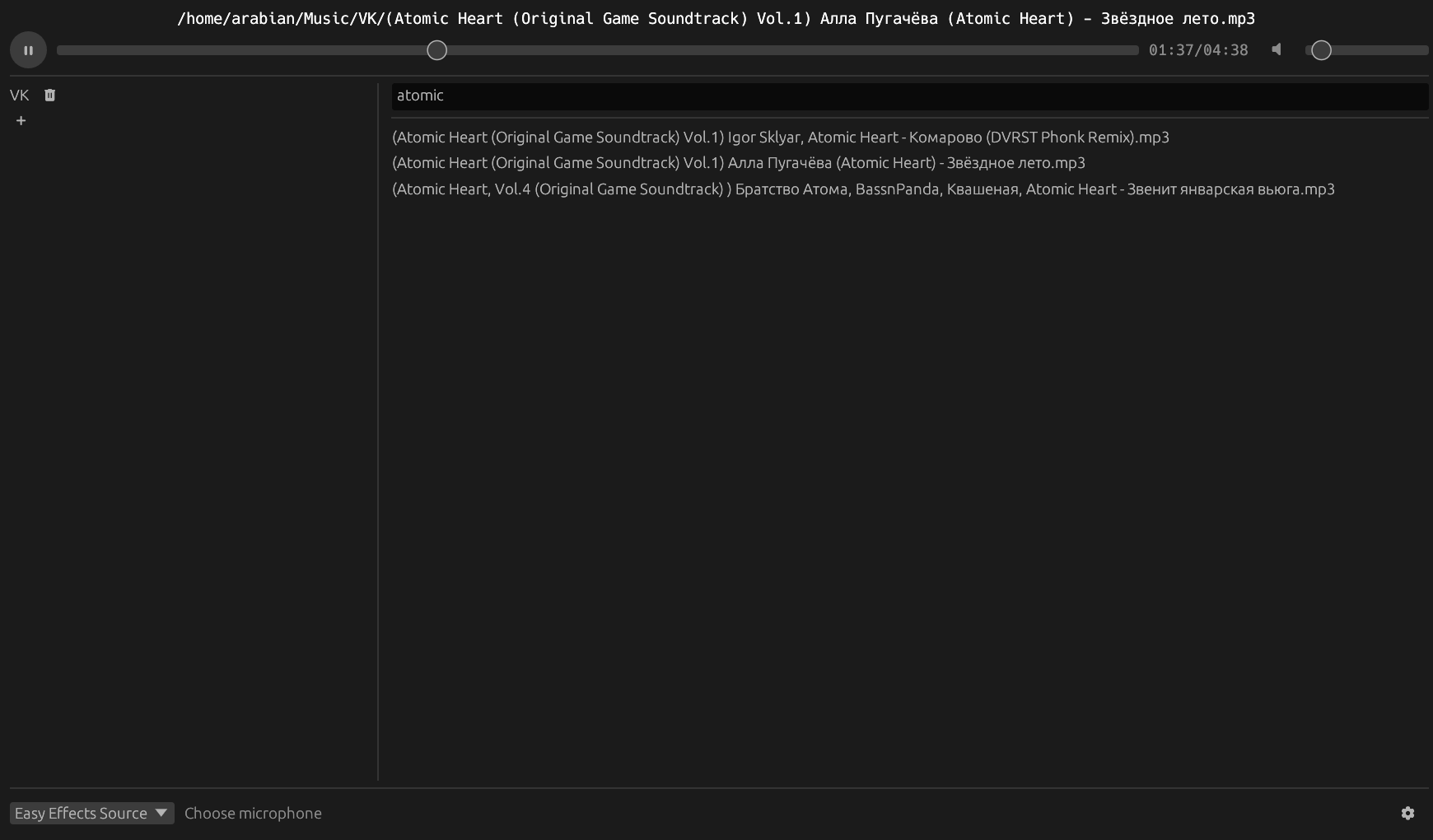
- Modern and Clean GUI: The interface is built with the egui library, ensuring an intuitive and responsive user experience.
- Sound Collection Management: Easily add and remove directories containing your audio files. The application scans these folders and displays all supported files for quick access.
- Quick Search: Use the built-in search bar to instantly find any sound file within your library.
- Detailed Playback Controls:
- Play/Pause button.
- Volume slider for individual sound adjustment.
- Position slider to fast-forward or rewind the audio.
- Persistent Configuration: The list of added directories and your selected audio output device are saved automatically, so you won’t need to reconfigure them every time you launch the application.
Website: github.com/arabianq/pipewire-soundpad
Support:
Developer: Tarasov Alexander
License: MIT License
Pipewire Soundpad is written in Rust. Learn Rust with our recommended free books and free tutorials.
Related Software
| Soundboards | |
|---|---|
| Soundux | Universal soundboard using PulseAudio modules or PipeWire linking |
| Amplitude Soundboard | Feature-rich soundboard |
| Pipewire Soundpad | Simple yet powerful soundboard application written in Rust |
| Soundboardd | Small local soundboard daemon |
| Zap | Makes your livestreams and videocasts more entertaining. |
| CasterSoundboard | Soundboard for hot-keying and playing back sounds |
Read our verdict in the software roundup.
 Explore our comprehensive directory of recommended free and open source software. Our carefully curated collection spans every major software category. Explore our comprehensive directory of recommended free and open source software. Our carefully curated collection spans every major software category.This directory is part of our ongoing series of informative articles for Linux enthusiasts. It features hundreds of detailed reviews, along with open source alternatives to proprietary solutions from major corporations such as Google, Microsoft, Apple, Adobe, IBM, Cisco, Oracle, and Autodesk. You’ll also find interesting projects to try, hardware coverage, free programming books and tutorials, and much more. Know a useful open source Linux program that we haven’t covered yet? Let us know by completing this form. |