

In this test I used each machine over many days performing a variety of general desktop tasks including, but not limited, to web surfing, email, compiling source code, watching video, listening to music, and other tasks.
The chart shows the power consumption of each machine. The figures are the power draw for the machine, not just the CPU.
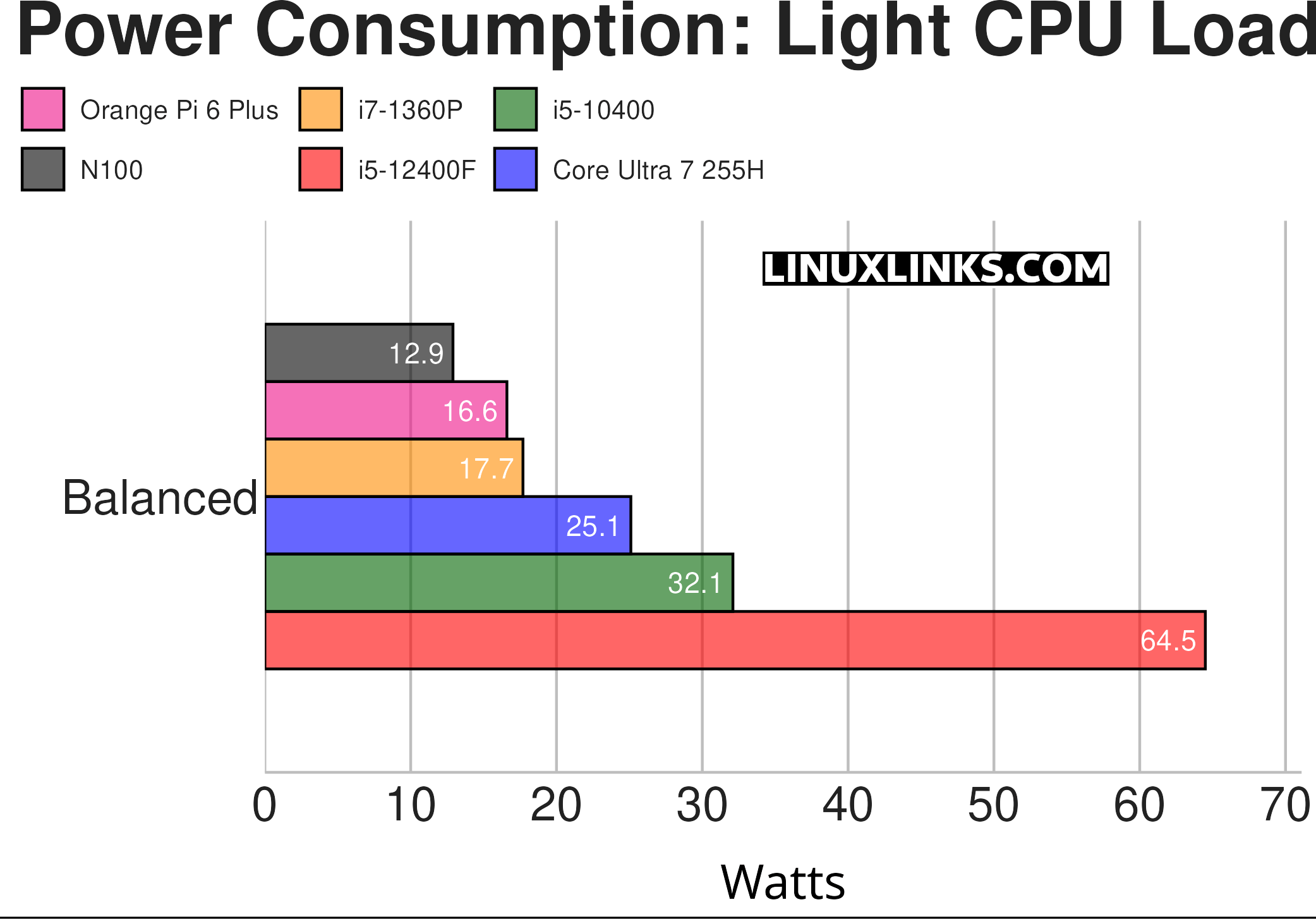
The Orange Pi 6 Plus does well compared to the N100 mini PC. Remember that the N100 is much slower.
Notes about the chart:
- The tasks do not include any activities that are GPU intensive such as gaming, running locally-hosted AI apps, video recording / live streaming etc.
- While the tests access software that uses the GPU (such as Xorg), the GPU power consumption is minimal (with the exception of the i5-12400F as the machine’s dedicated graphics card draws 21W at idle).
- Two screens are used on each machine.
- The i5-12400F machine hosts a dedicated graphics card, whereas the other machines all use onboard graphics.
- The Balanced CPU governor is used.
- The machines are running Ubuntu 25.10 with the exception of the Orange Pi 6 Plus which is running Debian 12.
Next page: Page 3 – Power Consumption With CPU Stressed
Pages in this article:
Page 1 – Power Consumption With System Idle
Page 2 – Power Consumption With Light Usage
Page 3 – Power Consumption With CPU Stressed
Page 4 – Electricity Costs
Complete list of articles in this series:
| Orange Pi 6 Plus | |
|---|---|
| Introduction | Introduction to the series and interrogation of the single-board computer |
| Benchmarks | Benchmarking the Orange Pi 6 Plus |
| Cores | The 3 different types of core |
| Power | Testing and comparing the power consumption |
| Ubuntu | Testing the Ubuntu 24.04 LTS image |
| BIOS | Exploring the BIOS |