
Last Updated on February 19, 2026
Interrogation of the System
I’ll use the inxi utility to delve into the technical specifications of the M6.
Processor
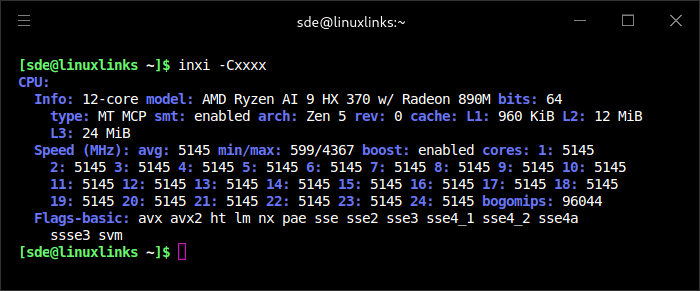
The M6 has the AMD Ryzen AI 9 HX 370 processor. This is a 12 core 24 thread CPU which runs at a base frequency of 2.0 GHz and a maximum frequency of 5.1 GHz for the 4 primary processors. The 8 secondary processors have a maximum clock frequency of 3.3 GHz. The processor is built on AMD’s Zen 5 architecture, which delivers excellent performance per watt.
The HX 370 is specifically designed with AI capabilities in mind, featuring a dedicated Neural Processing Unit (NPU) that contributes to its impressive 80 TOPS (Trillions of Operations Per Second) rating, with the NPU alone responsible for 50 TOPS.
At the time of taking the screenshot the machine is running under the maximum clock frequencies.
Graphics
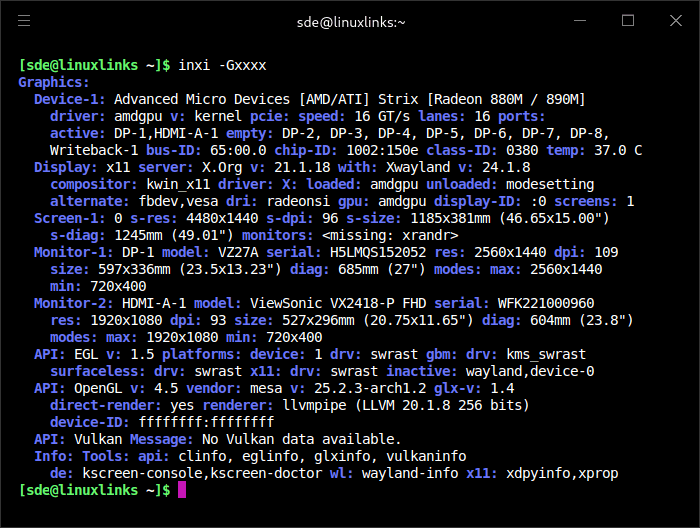
The machine is capable of driving 4 screens with 4K output. In the image below, I’ve got one monitor attached via HDMI and another via DisplayPort. I’ve also attached USB-C monitors during my testing.
For an iGPU, the Radeon 890M is capable of playing many games at 1080p with over 70 FPS with medium to high graphics settings. It features 16 compute units RDNA 3.5 (1,024 unified shaders), with a frequency that can reach up to 2,900 MHz. The AMD Radeon 890M also incorporates a next-generation ray-tracing engine. This enables realistic visual effects in compatible titles, as well as optimisations for recent video codecs, including AV1 and H.265. This provides smooth decoding of 4K and 8K content.
Disk
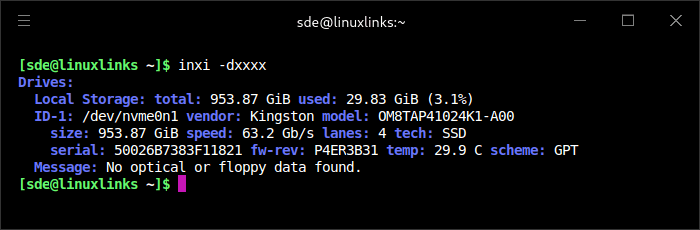
My machine came with a Kingston 1TB NVMe installed. That’s an PCIe 4.0×4 2280 SSD with a maximum read speed of 6,100 MB/s and a maximum write speed of 5,300 MB/s. It’s a fast QLC drive from a very reliable brand. The M6 can take a second NVMe too but only at PCIe 4.0×2.
Memory

The M6 has two DDR5 SODIMM slots taking a maximum of 64GB of memory as reported by inxi. It’s possible the machine may take a higher capacity but I’ve not tested that.
My machine came with 32GB of Crucial DDR5 RAM (2 x 16GB) running at 5600 MT/s, so it’ll be useful for memory intensive apps such as virtual machines. It’s also handy to have the option of upgrading the memory.
By default, the machine allocates slightly over 4GB of RAM to the iGPU. As mentioned on the previous page, it’s not possible to change the allocation.
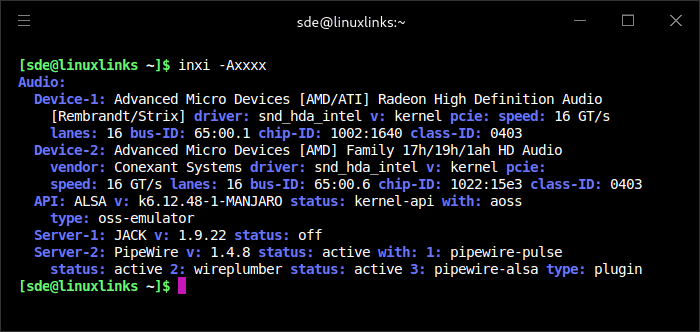
Audio
Bluetooth
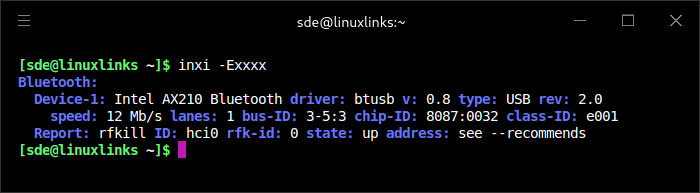
I’ve mostly tested the machine with the Manjaro distribution, but I’ve also tested other Arch-based distributions as well as Ubuntu 25.10. Its Bluetooth 5.2 works out of the box without any special configuration needed.
Network
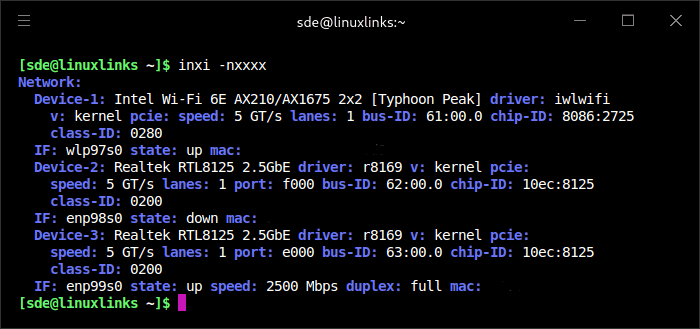
The M6 is well equipped from both a wireless and wired perspective. There’s a pair of 2.5Gb Ethernet ports as well as Intel Wi-Fi 6E. Networking works out of the box with all the distros I’ve tested with no additional drivers needed.
Temperature
Here’s the temperature of the machine and components as reported by inxi and sensors.
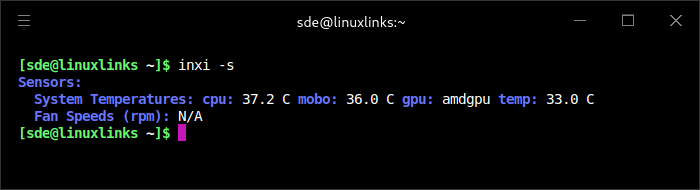
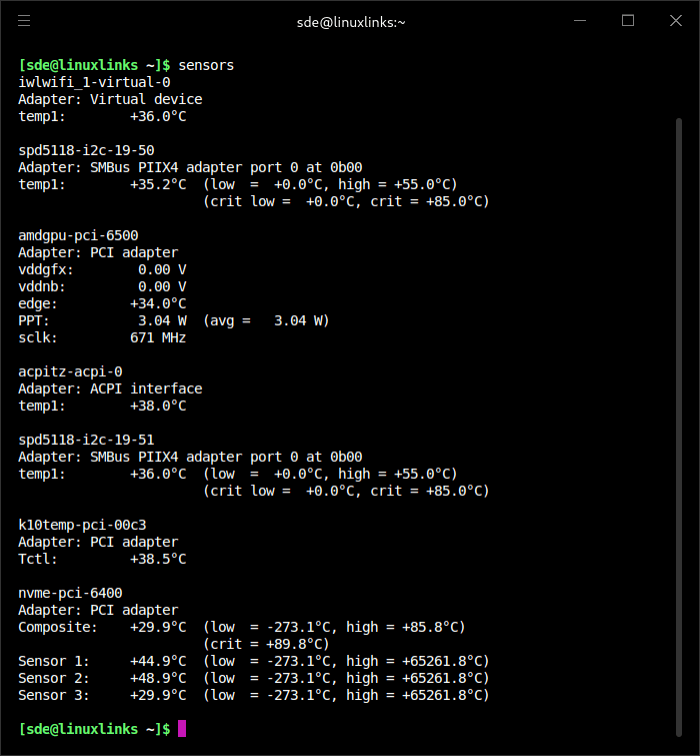
At the time of taking these readings, the room temperature was 18C and the M6 under very light load.
Summary
For the past week, I’ve been using the machine exclusively to maintain and update the website. A lot of my time is spent building (compiling) and evaluating open source software. The M6’s fast CPU makes light work of building complicated software as well as compiling all the R libraries I use with RStudio.
Even under heavy load, the machine is very quiet. This is such an important attribute to me. So many mini PCs are noisy under heavy load with the noise becoming intrusive. But that’s not the case with the M6.
In the next article in the series I’ll put the M6 through my benchmarking evaluation.
Pages in this article:
Page 1 – Introduction and Design
Page 2 – First Impressions running Linux
Page 3 – Interrogation of the System
Complete list of articles in this series:
| BOSGAME M6 HX370 AI Mini PC | |
|---|---|
| Introduction | Introduction to the series and interrogation of the machine |
| Benchmarks | Benchmarking the BOSGAME M6 HX370 AI Mini PC |
| Power | Testing and comparing the power consumption |
| BIOS | In the world of computing, BIOS, which stands for Basic Input/Output System, plays a crucial role |
| Noise | How quiet is this mini PC? |