

GnuPG stands for GNU Privacy Guard and is a tool for secure communication and data storage. The software has two main uses. The first is to encrypt data to ensure its privacy. The second is to “sign” data so that others can determine it is authentic and unmodified.
GnuPG is a superb tool though it’s a command line affair. If you’re looking for a GUI frontend, check out these tools. Simplify encryption, decryption, and digital signing, with a seamless interface for managing OpenPGP tasks.
Here’s our verdict captured in a legendary LinuxLinks-style ratings chart. Only free and open source software is eligible for inclusion.
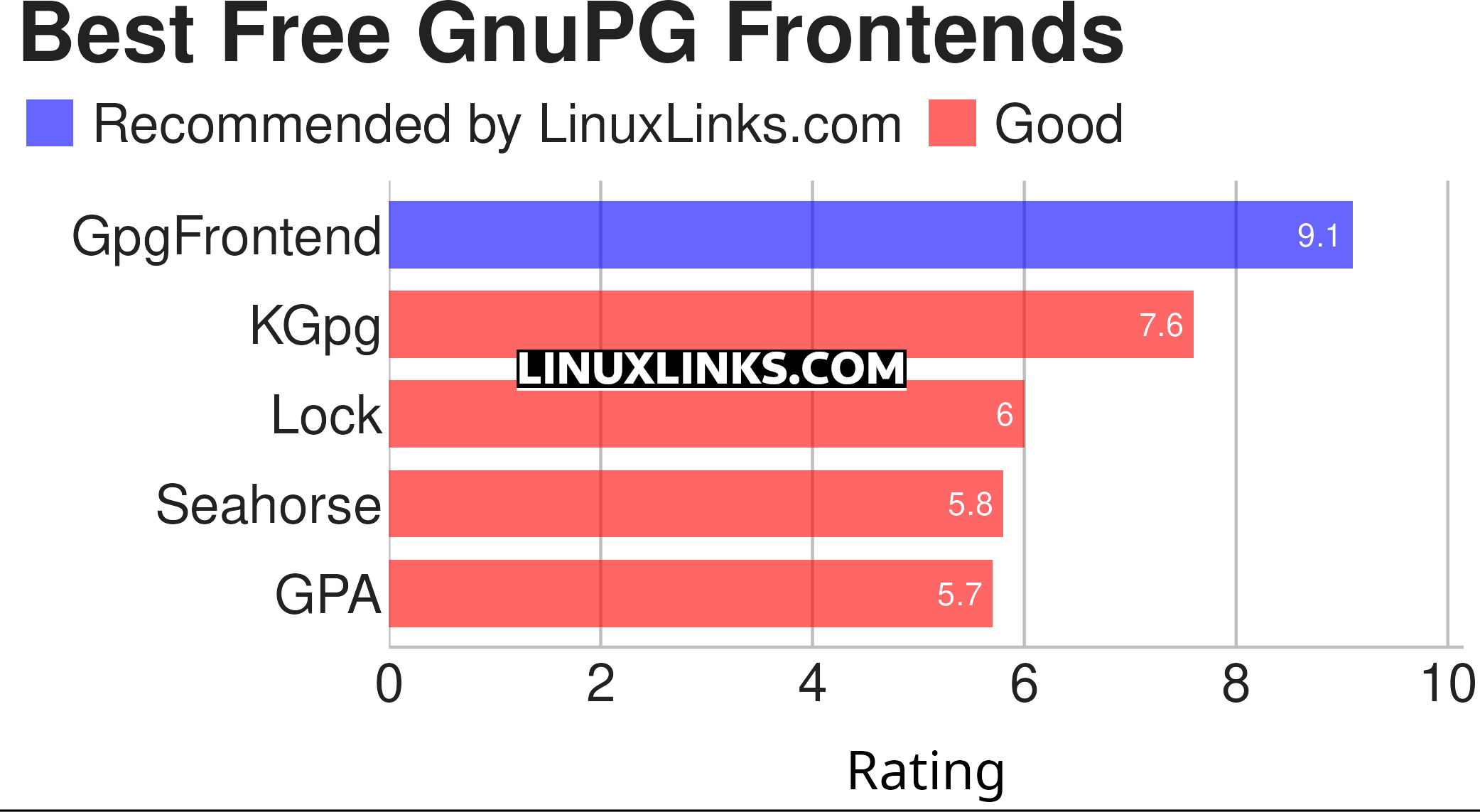
Let’s explore the 5 frontends. For each program we have compiled its own portal page, a full description with an in-depth analysis of its features, a screenshot of the software in action, together with links to relevant resources.
| GnuPG Frontends | |
|---|---|
| GpgFrontend | Awesome Qt-based cross-platform frontend |
| KGpg | Simple interface for GnuPG |
| Lock | Sports an attractive LibAdwaita GUI |
| Seahorse | GNOME application for managing encryption keys and passwords |
| GPA | GNU Privacy Assistant |
This article has been updated to reflect the changes outlined in our recent announcement.
 Explore our comprehensive directory of recommended free and open source software. Our carefully curated collection spans every major software category. Explore our comprehensive directory of recommended free and open source software. Our carefully curated collection spans every major software category.This directory is part of our ongoing series of informative articles for Linux enthusiasts. It features hundreds of detailed reviews, along with open source alternatives to proprietary solutions from major corporations such as Google, Microsoft, Apple, Adobe, IBM, Cisco, Oracle, and Autodesk. You’ll also find interesting projects to try, hardware coverage, free programming books and tutorials, and much more. Know a useful open source Linux program that we haven’t covered yet? Let us know by completing this form. |