

MPD is a powerful server-side application for playing music. In a home environment, you can connect an MPD server to a Hi-Fi system, and control the server using a notebook or smartphone. You can, of course, play audio files on remote clients. MPD can be started system-wide or on a per-user basis.
MPD runs in the background playing music from its playlist. Client programs communicate with MPD to manipulate playback, the playlist, and the database.
The client–server model provides advantages over all-inclusive music players. Clients can communicate with the server remotely over an intranet or over the Internet. The server can be a headless computer located anywhere on a network.
There’s graphical clients, console clients and web-based clients.
To provide an insight into the quality of software that is available, we have compiled a list of 11 best console-based MPD clients. Hopefully, there will be something of interest here for anyone who wants to use MPD on the command-line.
Here’s our verdict captured in a legendary LinuxLinks-style ratings chart.
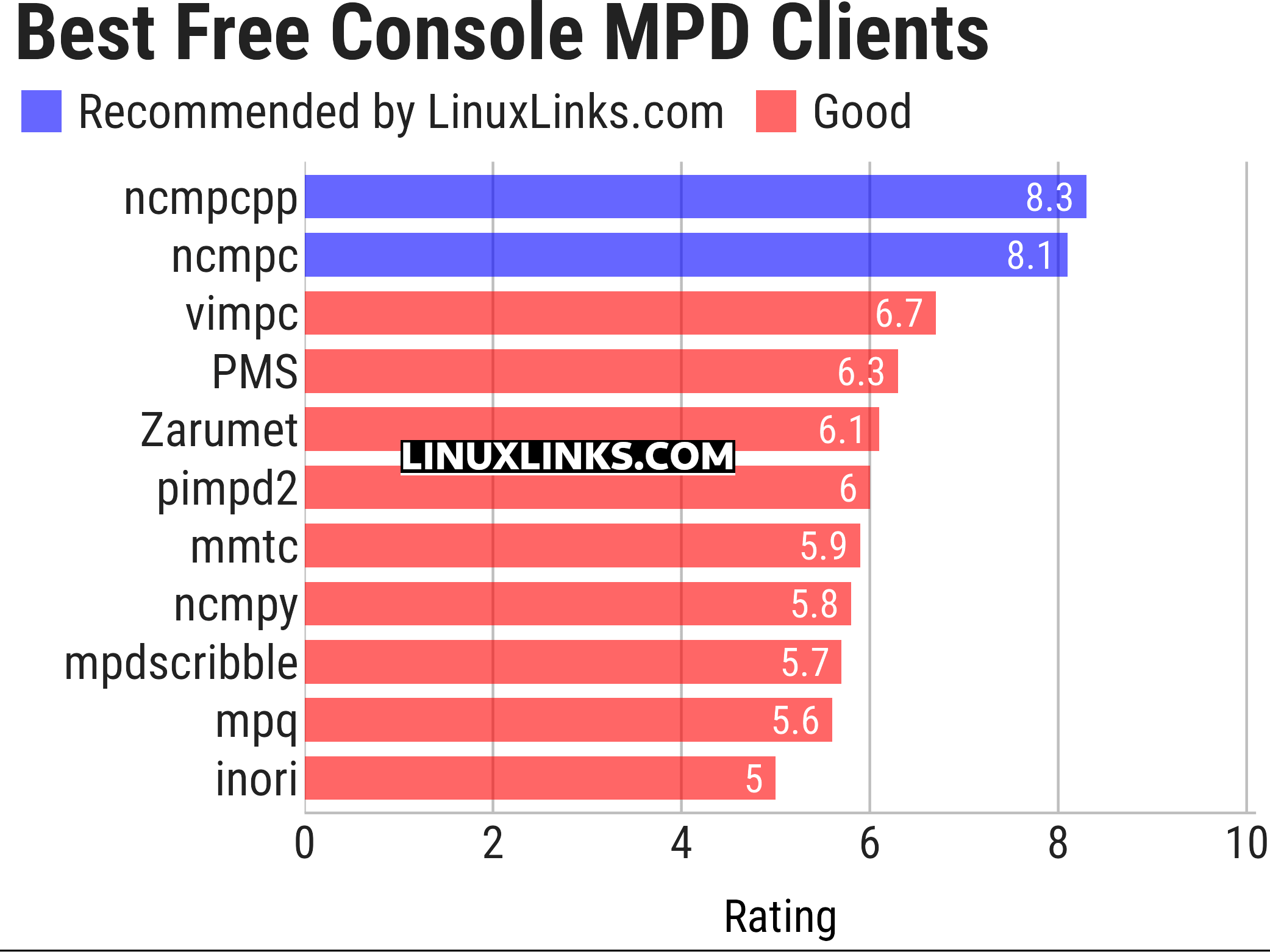
Let’s explore the 11 console MPD clients. For each program we have compiled its own portal page, a full description with an in-depth analysis of its features, together with links to relevant resources.
| Console MPD Clients | |
|---|---|
| ncmpcpp | Featureful and rock solid ncurses based MPD C++ client inspired by ncmpc |
| ncmpc | Curses based client written in C++ |
| vimpc | vi/vim inspired client for MPD written in C++ |
| PMS | Vim-like console client |
| Zarumet | Polished text user interface |
| pimpd2 | Perl-based client |
| mmtc | Very minimalistic client written in Rust |
| ncmpy | Curses based client written in Python language |
| mpdscribble | MPD client with scrobbling support |
| mpq | Minimalist viewer and manipulator for MPD written in Go |
| inori | Rust-based client |
This article has been updated to reflect the changes outlined in our recent announcement.
 Explore our carefully curated directory of recommended free and open source software, covering every major software category. Explore our carefully curated directory of recommended free and open source software, covering every major software category.The directory forms part of our extensive collection of articles for Linux enthusiasts. It includes hundreds of detailed reviews, together with free and open source alternatives to proprietary software from companies such as Google, Microsoft, Apple, Adobe, IBM, Cisco, Oracle, and Autodesk. LinuxLinks also covers interesting projects worth exploring, Linux-compatible hardware, free programming books and tutorials, and much more. Know a useful free and open source Linux application that we haven’t covered? Tell us about it using our submission form. |
Please read our Comment Policy before commenting.
I’m loving ncmpy.