
Last Updated on July 13, 2021
Synaptic is a graphical package management program for apt, an open source interface that handles the installation and removal of software on Debian / Ubuntu and its variants.
This application provides the same features as the apt-get command line utility with a graphical user interface front-end based on Gtk+. In other words, it lets users install, upgrade, or remove software packages.
Synaptic’s proficient package removal is a simple way of removing unneeded software on your system.
Features include:
- Install, remove, upgrade and downgrade single and multiple packages.
- Upgrade your whole system.
- Perform smart system upgrades.
- Manage package repositories (sources.list).
- Find packages by name, description and several other attributes.
- Select packages by status, section, name or a custom filter.
- Sort packages by name, status, size or version.
- Download the latest changelog of a package.
- Lock packages to the current version.
- Force the installation of a specific package version.
- Fix broken package dependencies.
- Undo/Redo of selections.
- Built-in terminal emulator for the package manager.
- Edit the list of used repositories (sources.list).
- Browse all available documentation related to a package.
Website: www.nongnu.org/synaptic
Support: Documentation
Developer: Alfredo Kojima, Michael Vogt, Gustavo Niemeyer and contributors
License: GNU GPL v2
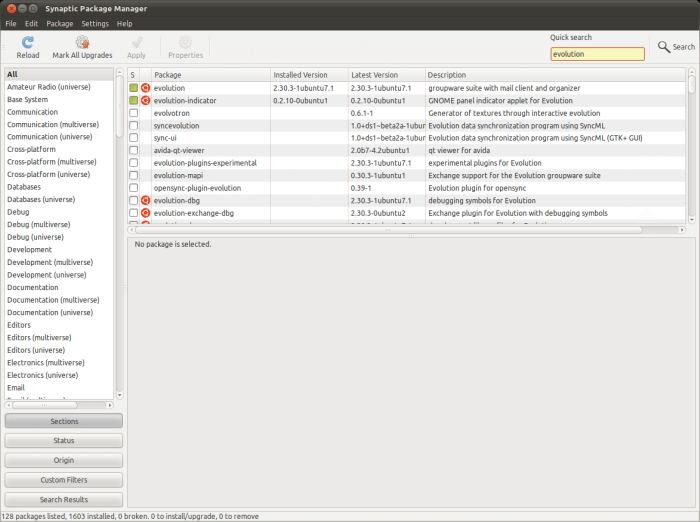
Synaptic is written in C, C++ and Python. Learn C with our recommended free books and free tutorials. Learn C++ with our recommended free books and free tutorials. Learn Python with our recommended free books and free tutorials.
Return to System Cleaning Home Page
| Explore Linux | |
|---|---|
 | Best Free and Open Source Software - A huge collection of recommended free and open source software covering every major category. |
 | In-depth Linux Software Reviews - Detailed assessments of Linux software covering features, usability and overall quality. |
 | The Big List of Active Linux Distros - An extensive collection of actively developed Linux distributions. |
 | Open Source Alternatives - Alternatives to software and services from Google, Microsoft, Apple, Adobe, IBM, Autodesk, Oracle and others. |
 | Essential Linux System Tools - Indispensable utilities for monitoring, maintaining and managing Linux systems. |
 | Linux Productivity Tools - Useful utilities for improving productivity and streamlining everyday tasks. |
 | Alternatives to Popular CLI Tools - Modern alternatives to familiar command-line utilities supplied with Linux systems. |
 | Awesome Free Linux Game Tools - Tools, utilities and companion software that improve gaming on Linux. |
 | Machine Learning on Linux - Machine learning and deep learning software, self-hosted applications and practical tools. |
 | Saving Money with Linux - Practical ways to reduce electricity consumption and lower computing costs with Linux. |
 | Linux Candy - Fun, entertaining and sometimes delightfully quirky software from the lighter side of Linux. |
Please read our Comment Policy before commenting.