

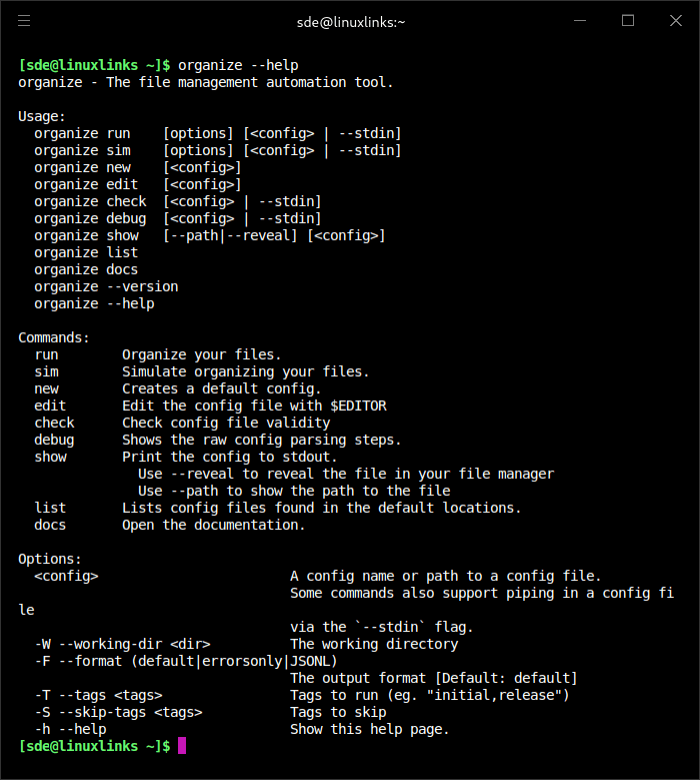
organize is a rule-based command-line file management automation tool that helps keep desktops, downloads folders, and document collections under control.
It lets users build configurable workflows to process files and folders based on criteria such as metadata, file nameso tasks like sorting photos, handling invoices and receipts, cleaning up incomplete downloads, removing duplicates, and automating routine file housekeeping.
This is free and open source software.
Key Features
- Supports simulation mode so you can preview changes before touching your files.
- Offers fast duplicate file detection.
- Extracts EXIF metadata for photo and image organization workflows.
- Can categorize files using text extracted from PDF, DOCX, and other document formats.
- Includes a powerful template engine for flexible rule creation.
- Supports inline Python and shell commands as filters and actions.
- Cross-platform support – runs on Linux, macOS, and Windows.
Website: github.com/tfeldmann/organize
Support:
Developer: Thomas Feldmann
License: MIT License
organize is written in Python. Learn Python with our recommended free books and free tutorials.
 Explore our comprehensive directory of recommended free and open source software. Our carefully curated collection spans every major software category. Explore our comprehensive directory of recommended free and open source software. Our carefully curated collection spans every major software category.This directory is part of our ongoing series of informative articles for Linux enthusiasts. It features hundreds of detailed reviews, along with open source alternatives to proprietary solutions from major corporations such as Google, Microsoft, Apple, Adobe, IBM, Cisco, Oracle, and Autodesk. You’ll also find interesting projects to try, hardware coverage, free programming books and tutorials, and much more. Discovered a useful open source Linux program that we haven’t covered yet? Let us know by completing this form. |