

A window manager is software that manages the windows that applications bring up. For example, when you start an application, there will be a window manager running in the background, responsible for the placement and appearance of windows.
It is important not to confuse a window manager with a desktop environment. A desktop environment typically consists of icons, windows, toolbars, folders, wallpapers, and desktop widgets. They provide a collection of libraries and applications made to operate cohesively together. A desktop environment contains its own window manager.
There are a few different types of window managers. This article focuses on tiling window managers. They automate the common task of arranging windows.
What does a tiling window manager offer?
- This type of window manager can help you to optimize your workflow. It lets you configure your desktop how you want it.
- Efficiently use screen real-estate by automatically arranging windows with minimal visual complications.
- Tiling window managers are usually designed to be used entirely with the keyboard or with keyboard & mouse. This is to boost productivity (constantly switching between a keyboard and mouse is slow). It may also help to reduce repetitive strain injury.
Our recommendations are captured in a legendary LinuxLinks-style ratings chart. They are all free and open source software.
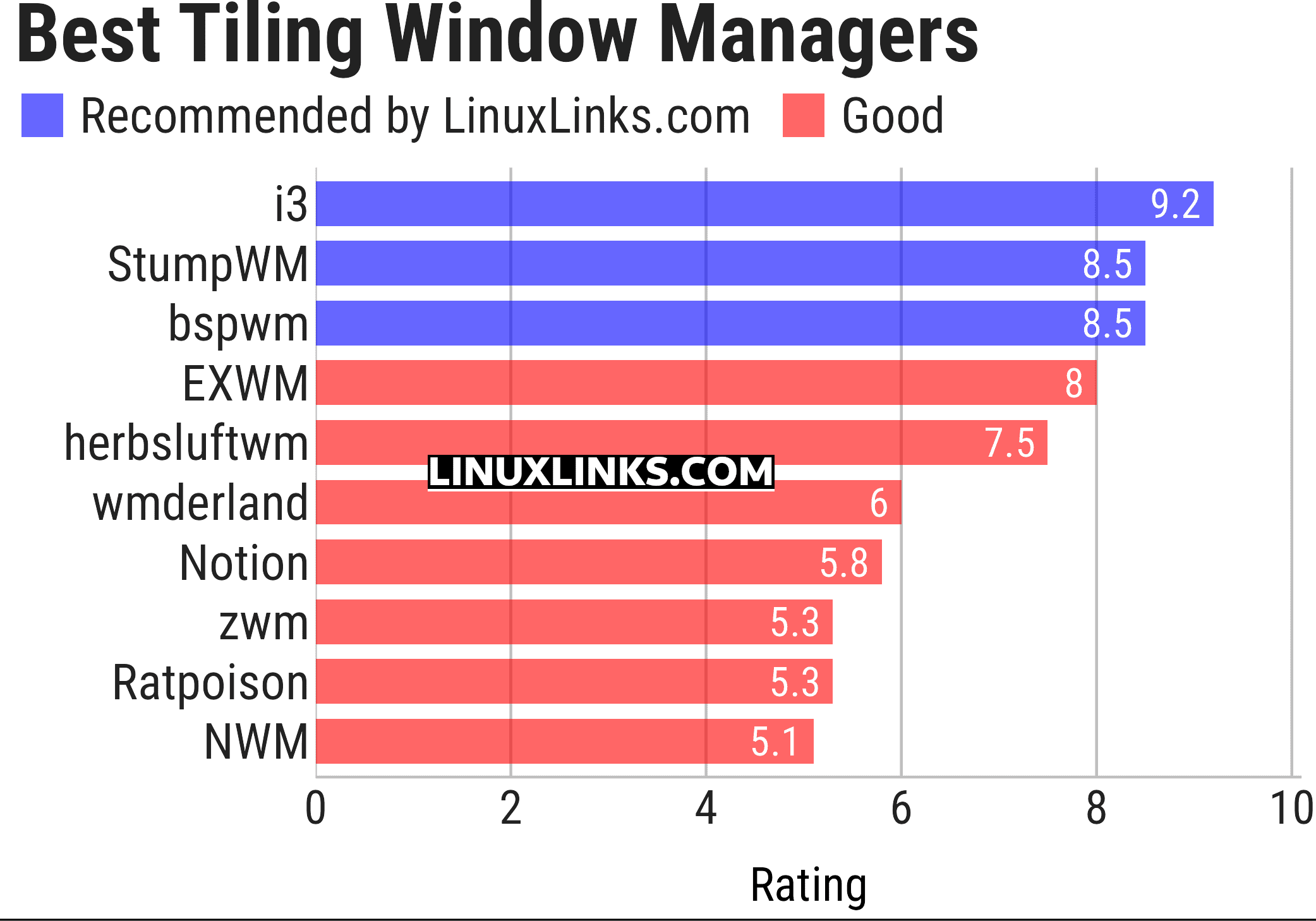
Let’s explore the tiling window managers. Click the links in the table below to learn more about each window manager.
| X11 Tiling Window Managers | |
|---|---|
| i3 | Improved tiling window manager |
| StumpWM | Common Lisp window manager |
| bspwm | Based on binary space partitioning |
| EXWM | Full-featured tiling X window manager for Emacs |
| herbstluftwm | Basic tiling concept is that the layout is represented by a binary tree |
| wmderland | Offers no bloated features, an easy-to-use config, and a very small footprint |
| Notion | Originally a fork of Ion |
| zwm | Minimal, opinionated window manager with a keyboard-driven workflow |
| Ratpoison | Keyboard-only window manager |
| NWM | Lightweight window manager with a simple, efficient workflow |
This article has been updated to reflect the changes outlined in our recent announcement.
Dynamic window managers for X11 are covered separately.
 Explore our carefully curated directory of recommended free and open source software, covering every major software category. Explore our carefully curated directory of recommended free and open source software, covering every major software category.The directory forms part of our extensive collection of articles for Linux enthusiasts. It includes hundreds of detailed reviews, together with free and open source alternatives to proprietary software from companies such as Google, Microsoft, Apple, Adobe, IBM, Cisco, Oracle, and Autodesk. LinuxLinks also covers interesting projects worth exploring, Linux-compatible hardware, free programming books and tutorials, and much more. Know a useful free and open source Linux application that we haven’t covered? Tell us about it using our submission form. |
Please read our Comment Policy before commenting.
for those who are too lazy to customize, try a arch based distro called Hash, 3 tilingwm plus Awesome to choose with out-of-the-box settings to use, highly recommend!