
Accessibility is the degree to which products, devices, services, or environments are available to as many people as possible whatever their circumstances. Accessibility can be viewed as the ability to access and benefit from a system or entity. Accessibility is paramount. Social inclusion is not an act of charity but a fundamental human right.
There are several different kinds of keyboards for PCs. The most common type is a physical, external keyboard that plugs into your PC. But you can use a virtual keyboard with Linux instead of a physical keyboard.
There’s no need for a touchscreen monitor. The software displays a visual keyboard with all the standard keys, so you can use a mouse or another pointing device to select keys, or use a physical single key or group of keys to cycle through the keys on the screen.
Here’s our verdict captured in a legendary ratings chart. We feature free and open source software only here.
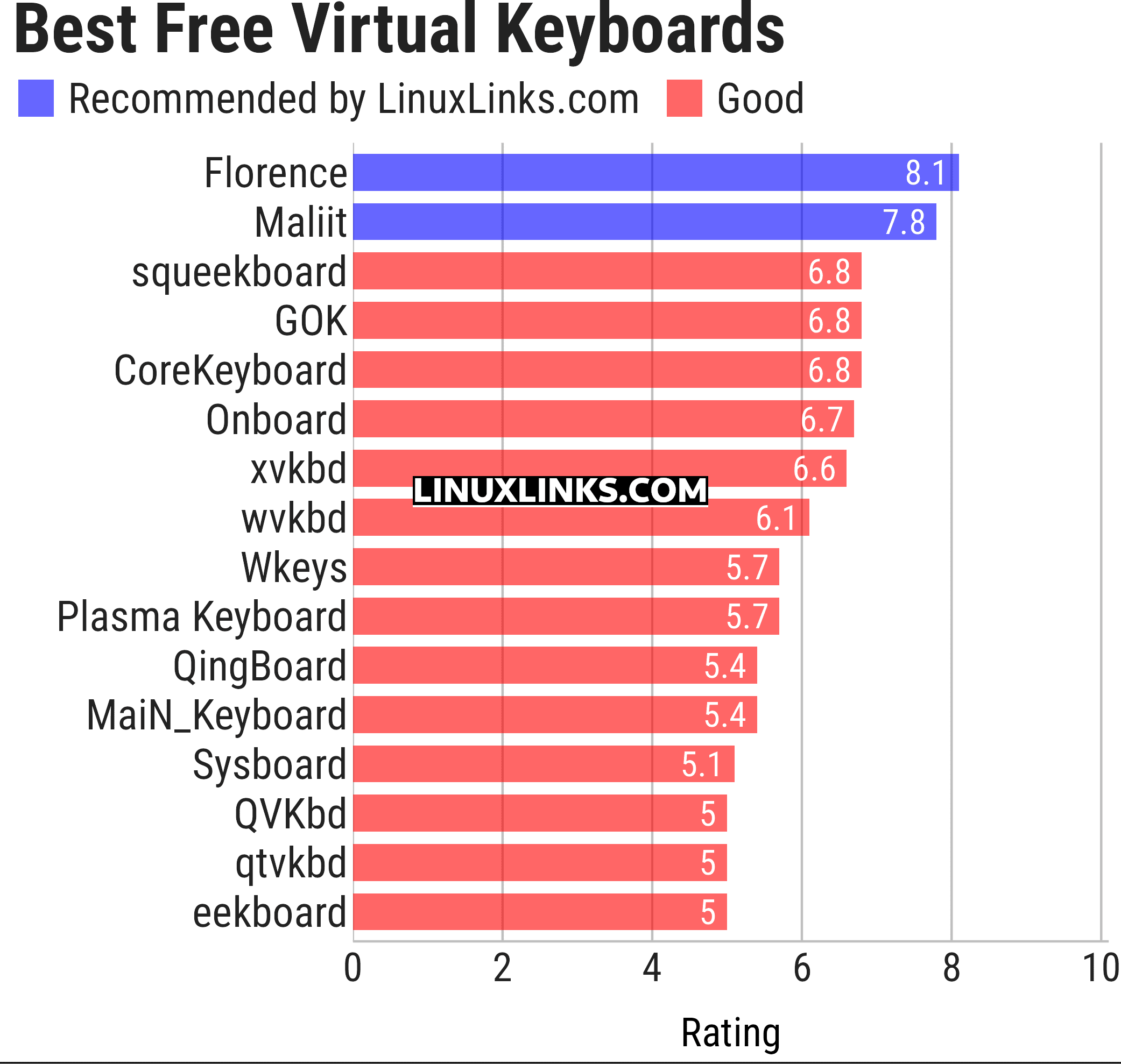
Let’s explore the 16 on-screen keyboard tools. For each program we have compiled its own portal page, a full description with an in-depth analysis of its features, a screenshot, together with links to relevant resources.
| Virtual Keyboards | |
|---|---|
| Florence | Extensible scalable virtual keyboard |
| Maliit | Virtual keyboard implemented as a plug-in for Maliit Framework |
| squeekboard | Keyboard-shaped input method supporting Wayland |
| GOK | GNOME On Screen Keyboard |
| CoreKeyboard | Simple virtual keyboard with word suggestions |
| Onboard | Useful for tablet PC users and for mobility impaired users |
| xvkbd | Virtual (graphical) keyboard program |
| wvkbd | On-screen keyboard for wlroots |
| Wkeys | Wayland-focused keyboard offering compact controls for direct text entry |
| Plasma Keyboard | Adaptive Plasma input panel designed for touchscreens and tablets |
| QingBoard | Qt-based on-screen typing tool with configurable layouts and themes |
| MaiN_Keyboard | Flexible desktop input panel with layouts suited to accessibility needs |
| Sysboard | Minimal Wayland typing interface built for simple, lightweight operation |
| QVKbd | Virtual keyboard written in C++ and QML |
| qtvkbd | Fork of kvkbd with all KDE4 dependencies replaced with Qt components |
| eekboard | Easy to use virtual keyboard toolkit |
This article has been updated to reflect the changes outlined in our recent announcement.
 Explore our carefully curated directory of recommended free and open source software, covering every major software category. Explore our carefully curated directory of recommended free and open source software, covering every major software category.The directory forms part of our extensive collection of articles for Linux enthusiasts. It includes hundreds of detailed reviews, together with free and open source alternatives to proprietary software from companies such as Google, Microsoft, Apple, Adobe, IBM, Cisco, Oracle, and Autodesk. LinuxLinks also covers interesting projects worth exploring, Linux-compatible hardware, free programming books and tutorials, and much more. Know a useful free and open source Linux application that we haven’t covered? Tell us about it using our submission form. |
Please read our Comment Policy before commenting.
wow , helpfull post , thank you .
You missed wvkbd, the other wayland virtual keyboard (which can be used for swipe-typing).
We didn’t ‘miss’ it. The purpose is to select the best virtual keyboards. You’ve not explained why the program warrants inclusion.
You’re the one who is writing the article. It’s your task to tell why it might be better. And you missed it because just from a cursory glance, I can tell that it has two immediate advantages: 1- it is maintained, 2- it works on wayland.
No, that’s not my task.
In any event, we don’t include software just because it’s maintained and works under Wayland. We select the best… Of course, actively maintained software often improves over time. So we update roundups on a regular basis.
Onboard does not work under linux. Segfault.
This seems to be a very recent issue as it was working fine on our test system.
There is a fork of onboard on github which doesn’t have the seg fault issue.
And I could not build florence under archlinux.
Did you try raising it with the maintainer, SunRed?
Changing the input method from XInput to GTK resolves the issue but not completely
The keyboard scanner in the program runs incorrectly with some configurations. There are many options under ord/onboard/scanner. May be one of them can fix the issue.
Uinput based virtual keyboard. It support wayland and X11
Link removed. Please read the comments FAQ. Thanks.
This appears to be a library.
Florence no longer works in Mint.(It is a shame. I loved Florence!)
Onboard works (with some severe settings modifications).
I only found one AppImage and that is Keyboard Client (KeyboardClient-f00ef2d-x86_64.AppImage)
Unfortunately, I can’t get Keyboard Client to work.
Once launched the window reads “No Keyboards Selected”.
The only choices are Refresh, Download, & Upload.
Clicking on them does nothing.
It would be nice to have an AppImage that gets an honorable mention.
Issues like this really stem from a fundamental issue of how to fund open source software.
Indeed, the term free software is a misnomer. Free software isn’t free in developers’ terms. It takes a lot of effort, guile, and skill to create and maintain software that’s published under an open source license.