

A web browser is the quintessential desktop application. Everyone needs one, and there is not a desktop Linux distribution around that does not make a web browser available.
This type of software application is responsible for retrieving and presenting information held on the World Wide Web, a system of interlinked hypertext documents accessed via the internet. Web browsers allow users to view web pages which often contain a mixture of text, images, videos, and other multimedia.
The vast majority of Linux users would never be satisfied without access to a graphical user interface.
However, even in 2026 there remain many reasons why console based applications can be very useful.
Although console applications are very useful for updating, configuring, and repairing a system, their benefits are not only confined to system administration. Console based applications are light on system resources (very useful on low spec machines), can be faster and more efficient than their graphical counterparts, they do not stop working when X/Wayland needs to be restarted, and they are great for scripting purposes.
In the vast majority of situations running a graphical web browser is preferable. But there are still use cases for console web browsers. For example, if you’re present at a location with only very slow internet connection (e.g. tethered from a cell phone), a console web browser may be useful as it’ll render pages faster. And given that console based web browsers don’t process JavaScript, they use fewer CPU resources. Users with visual impairment or partial blindness may find console web browsers helpful as they are easier to integrate with text-to-speech software.
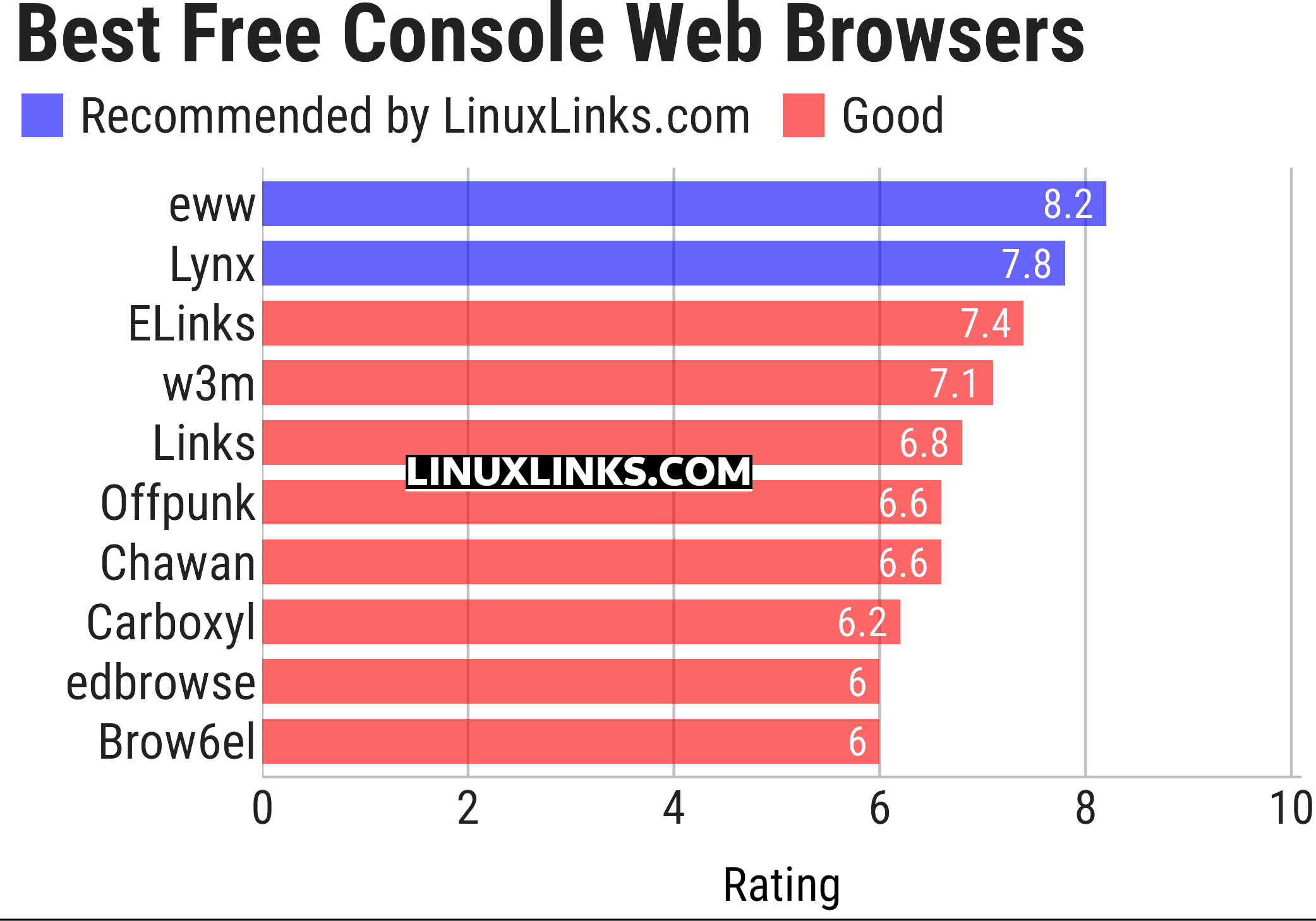
Here’s our verdict captured in a legendary LinuxLinks-style ratings chart. They are all free and open source software.
| Console Web Browsers | |
|---|---|
| eww | Emacs Web Wowser. It's integrated into Emacs, the famous text editor |
| Lynx | Legendary web browser that's still maintained |
| ELinks | Advanced and well-established feature-rich browser. Extend with Lua or Guile |
| w3m | Browser and terminal pager |
| Links | Text and graphic web browser with pull-down menu system |
| Offpunk | Offline-first command-line browser |
| Chawan | TUI web (and (S)FTP, Gopher, Gemini, ...) browser with CSS |
| Carboxyl | Chromium-based browser rendering modern websites directly in a console |
| edbrowse | Text editor, web browser and email client inspired by ed |
| Brow6el | Terminal web browser with graphics support |
Browsh is worthy of a mention. It’s technically not a web browser as it uses a headless version of Mozilla Firefox to fetch and parse web pages.
This article has been updated to reflect the changes outlined in our recent announcement.
 Explore our comprehensive directory of recommended free and open source software. Our carefully curated collection spans every major software category. Explore our comprehensive directory of recommended free and open source software. Our carefully curated collection spans every major software category.This directory is part of our ongoing series of informative articles for Linux enthusiasts. It features hundreds of detailed reviews, along with open source alternatives to proprietary solutions from major corporations such as Google, Microsoft, Apple, Adobe, IBM, Cisco, Oracle, and Autodesk. You’ll also find interesting projects to try, hardware coverage, free programming books and tutorials, and much more. Know a useful open source Linux program that we haven’t covered yet? Let us know by completing this form. |
Please read our Comment Policy before commenting.
What about Vim?
browsh seems pretty nice. It just happens to use headless Firefox but does so in a really effective, cli-only way. Still actively being worked on.
Line Mode Browser (last update 6 years ago) so maybe too old to include here?