

In Operation
Let’s pick a voice to use. Here’s a list of the available pre-trained voices.
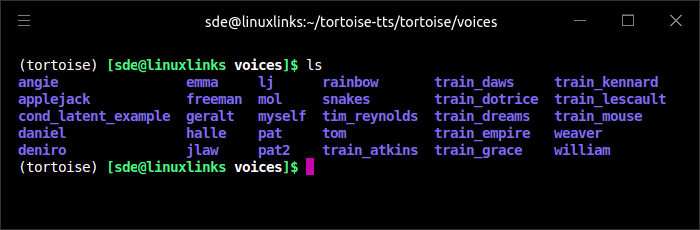
Here’s example output using the emma voice. We’ve chosen the high_quality preset which does significantly increase the processing time.
$ python tortoise/do_tts.py --output_path /home/sde/results --preset high_quality --voice emma --text "Tortoise is a text to speech program built with the following priorities: Strong multi-voice capabilities. Highly realistic prosody and intonation."
To give you a flavour of some of the other voices, check out these example outputs.
$ python tortoise/do_tts.py --output_path /home/sde/results --preset high_quality --voice pat --text "We hope you enjoy our reviews. We cover both software and hardware from a Linux perspective. We love receiving your thoughts on our site, so please share in the comments section below."
$ python tortoise/do_tts.py --output_path /home/sde/results --preset high_quality --voice tim_reynolds --text "Thanks to everyone that has donated to our site. We really appreciate your support."
There are also a couple of scripts that let you use text files. Here’s example output with random voices:
$ python tortoise/read.py --textfile /home/sde/linux-intro --voice random
Tortoise lives up to its name in processing speed. The above clip took just over 18 minutes to generate. But there are other presets available.
Here’s the same text read using the ultra fast preset. Processing takes a mere 104 seconds.
$ python tortoise/read.py --preset ultra_fast --textfile /home/sde/linux-intro --voice random
With the high quality preset, processing time took over 25 minutes for the same text.
$ python tortoise/read.py --preset high_quality --textfile /home/sde/linux-intro --voice random
Summary
Tortoise is an awesome text-to-speech program. It is extremely slow in generating samples if you don’t use the ultra_fast preset, but the quality is extremely good. For the best results, you’ll need to train your own voices.
Tortoise has its own API which lets you use it programmatically.
It’s possible to use Tortoise without a dedicated NVIDIA GPU, but expect processing to be really slow. As we explained above, our test machine with its NVIDIA RTX 3060 Ti graphics card took 104 seconds to generate 70 seconds of audio with the ultra_fast preset. For illustration purposes, we repeated the process with a machine without a dedicated graphics card. The machine has a respectable CPU (an Intel i7-1360P with 12 cores, 16 threads). Processing took 28 minutes 58 seconds to generate the audio file with that CPU.
The upshot is that you really do need an NVIDIA dedicated graphics card if you want to run Tortoise.
Website: github.com/neonbjb/tortoise-tts
Support:
Developer: James Betker
License: Apache License v2.0
Tortoise is written in Python. Learn Python with our recommended free books and free tutorials.
 For other useful open source apps that use machine learning/deep learning, we’ve compiled this roundup.
Pages in this article:
Page 1 – Introduction and Installation
Page 2 – In Operation and Summary
Related Software
| Speech Tools | |
|---|---|
| Piper | Fast, local neural text to speech system |
| Tortoise | Multi-voice text-to-speech system trained with an emphasis on quality |
| Coqui TTS | Offers pretrained models in more than 1,100 different languages |
| Bark | Transformer-based text-to-audio model. |
| Dia | 1.6B parameter text to speech model |
| Festival | General multi-lingual speech synthesis system |
| PraatSpeechAnalyser | Software for speech analysis and synthesis |
| Speech Note | Speech to Text, Text to Speech and Machine Translation |
| Mimic 3 | Lightweight Text to Speech engine |
| OrcaScreenReader | Scriptable screen reader |
| MeloTTS | High-quality multi-lingual text-to-speech library |
| Parler-TTS | Lightweight text-to-speech (TTS) model |
| Flite | Small, fast run time text to speech synthesis engine |
| RHVoice | Gives the visually impaired a synthesis voice with their screen reader |
| eSpeak NG | Continuation of the eSpeak project |
| eSpeak | Speech synthesizer using a formant synthesis method |
| Orpheus-TTS-FastAPI | High-performance self-hosted text-to-speech server |
| Gespeaker | GTK-based frontend for eSpeak |
| VoiceGen | Simple text-to-speech application |
| Glate | Google Translator and Text To Speech Service |
Read our verdict in the software roundup.
 Explore our comprehensive directory of recommended free and open source software. Our carefully curated collection spans every major software category. Explore our comprehensive directory of recommended free and open source software. Our carefully curated collection spans every major software category.This directory is part of our ongoing series of informative articles for Linux enthusiasts. It features hundreds of detailed reviews, along with open source alternatives to proprietary solutions from major corporations such as Google, Microsoft, Apple, Adobe, IBM, Cisco, Oracle, and Autodesk. You’ll also find interesting projects to try, hardware coverage, free programming books and tutorials, and much more. Discovered a useful open source Linux program that we haven’t covered yet? Let us know by completing this form. |