

The phrase “A picture is worth a thousand words” refers to the idea that a solitary still image can provide as much information as a large amount of descriptive text. Essentially, pictures convey information more effectively and efficiently than words can.
A screenshot is an image captured by a computer to record the output of a visual device. Screen capture software enable screenshots to be taken on a computer. This type of software has a wide range of uses. As an image can illustrate the operation of computer software so well, screenshots play a crucial role in software development and documentation. Alternatively, if you have a technical problem with your computer, a screenshot allows a technical support department to understand the problems you are facing. Writing computer-related articles, documentation and tutorials is nigh on impossible without a good tool for creating screenshots.
Linux has a good selection of versatile open source screenshot programs, both graphical and console based. This roundup focuses on command-line tools.
Here’s our verdict captured in a legendary LinuxLinks-style ratings chart. Only free and open source software is eligible for inclusion.
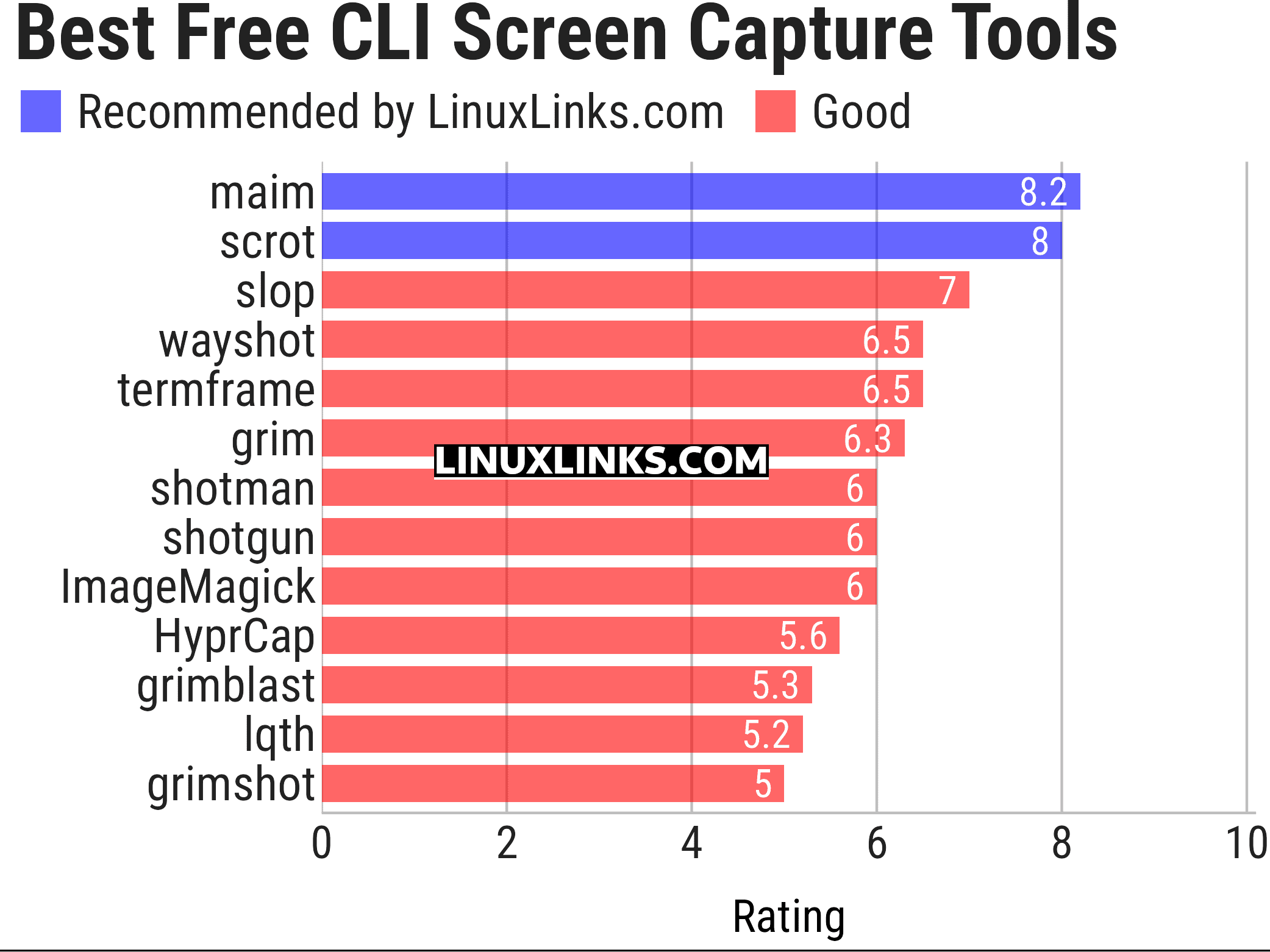
Let’s explore the 13 screen capture tools at hand. For each title we have compiled its own portal page, a full description with an in-depth analysis of its features, screenshots, together with links to relevant resources.
| CLI Screen Capture Tools | |
|---|---|
| maim | Make Image aims to improve on scrot |
| scrot | SCReenshOT is a simple command line screen capture utility |
| slop | Queries for a selection from the user and prints the region to stdout |
| wayshot | Screenshot tool for wayland compositors |
| termframe | Terminal output SVG screenshot tool |
| grim | Utility to take screenshots of Wayland desktops |
| shotman | Uncompromising screenshot tool for Wayland compositors |
| shotgun | Minimal screenshot utility |
| ImageMagick | Create, edit, and compose bitmap images |
| HyprCap | Capture screenshots and screen recordings on Hyprland |
| grimblast | Capture windows, selected areas, and screens on Hyprland |
| lqth | Simple but fast screenshot utility inspired by xscreenshot |
| grimshot | Capture windows, selected areas, and screens under Sway |
Looking for GUI screen capture tools? They are covered in this separate roundup.
This article has been updated to reflect the changes outlined in our recent announcement.
 LinuxLinks helps you discover the best free and open source software for Linux. Explore our extensive collection of recommended applications, including alternatives to popular proprietary software. We also publish software reviews, Linux tutorials, hardware reviews, free programming books and articles covering the wider open source community. Browse our Linux resources to discover more. Know a useful free and open source Linux application we haven't covered? Suggest a program for inclusion. Has your software been featured on LinuxLinks? Display one of our Featured on LinuxLinks badges on your website or GitHub README. |
Please read our Comment Policy before commenting.