

A file manager is software which provides a user interface to assist in the organisation of files. It helps users with their daily work in managing their files on a hard drive or other storage device. With terabyte hard disks becoming prevalent, file managers represent an essential tool in managing file systems.
Every file manager provides basic operations such as to create, open, view, edit, search, rename, move copy, and delete files. However, file managers typically come supplied with sophisticated functionality including network connectivity, directory synchronizing, archive handling, advanced searching, shortcuts, file/folder comparisons, checksums, plugins, and more, making them an incredibly powerful tool.
Web technologies are also increasingly used to build file managers for Linux, ranging from browser-accessed self-hosted tools to native desktop applications built with frameworks such as Tauri and Electron.
This roundup focuses on web-based Linux file managers. Hopefully, there will be something of interest for anyone who wishes to have more control over managing their files.
Here’s our verdict captured in a legendary LinuxLinks-style ratings chart. Only free and open source software is eligible for inclusion. Note the rating only considers the software’s functionality as a file manager. Some of the software included are more proficient in other areas.
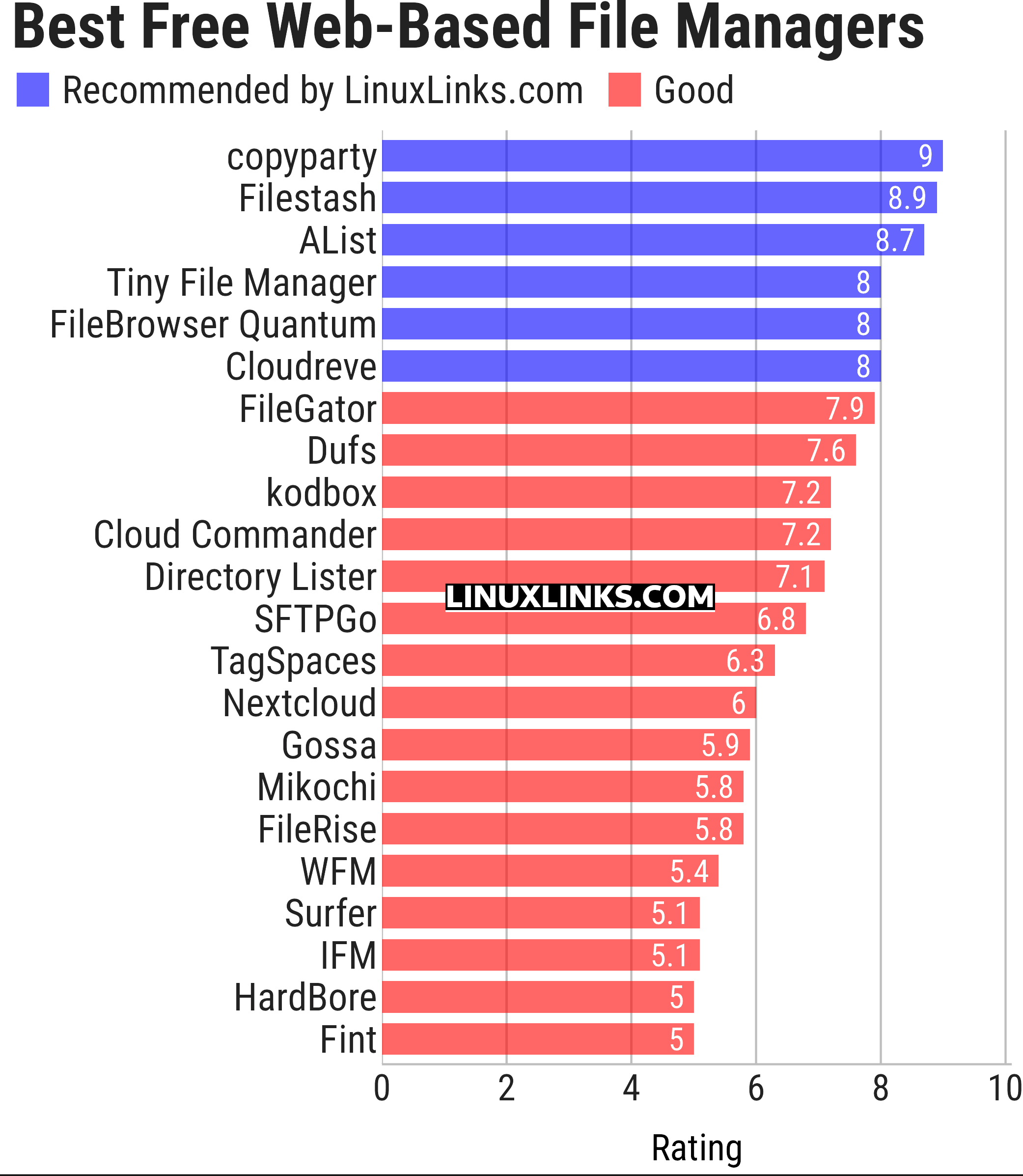
Click the links in the table below to learn more about each file manager.
| Web-Based File Managers | |
|---|---|
| copyparty | Portable file server |
| Filestash | Dropbox-like file manager |
| AList | File list program that supports multiple storages |
| Tiny File Manager | Versatile web-based PHP file manager |
| FileBrowser Quantum | Browser-based storage access with fast search |
| Cloudreve | Self-hosted file management system with multi-cloud support |
| FileGator | Powerful multi-user file manager |
| Dufs | Fle server that supports static serving |
| kodbox | Self-hosted document management and collaboration platform |
| Cloud Commander | For the web with console and editor |
| Directory Lister | Browse and share folders |
| SFTPGo | WebAdmin UI lets you manage users, folders, and more |
| TagSpaces | Offline, open source, personal data manager |
| Nextcloud | Personal cloud storage, text editor, photo gallery, file share,... |
| Gossa | Fast and simple multimedia fileserver |
| Mikochi | Browse, upload and stream media from a NAS or home server |
| FileRise | Self-hosted storage with sharing, access controls and uploads |
| WFM | Standalone browser interface for browsing and editing server files |
| Surfer | Simple static file server |
| IFM | Improved File Manager |
| HardBore | Sub-2ms cold start, native OS integration, full keyboard navigation |
| Fint | Keyboard-driven file manager |
There are many other good Linux file managers not included in this roundup. These are featured in specific roundups in the Productivity section.
This article has been updated to reflect the changes outlined in our recent announcement.
 LinuxLinks helps you discover the best free and open source software for Linux. Explore our extensive collection of recommended applications, including alternatives to popular proprietary software. We also publish software reviews, Linux tutorials, hardware reviews, free programming books and articles covering the wider open source community. Browse our Linux resources to discover more. Know a useful free and open source Linux application we haven't covered? Suggest a program for inclusion. Has your software been featured on LinuxLinks? Display one of our Featured on LinuxLinks badges on your website or GitHub README. |
Please read our Comment Policy before commenting.
I use Double Commander as GUI and vifm as text based file managers.
None of those are listed.
The roundup focuses on web-based file managers, not GUI or text based file managers. There are separate roundups for those types.